
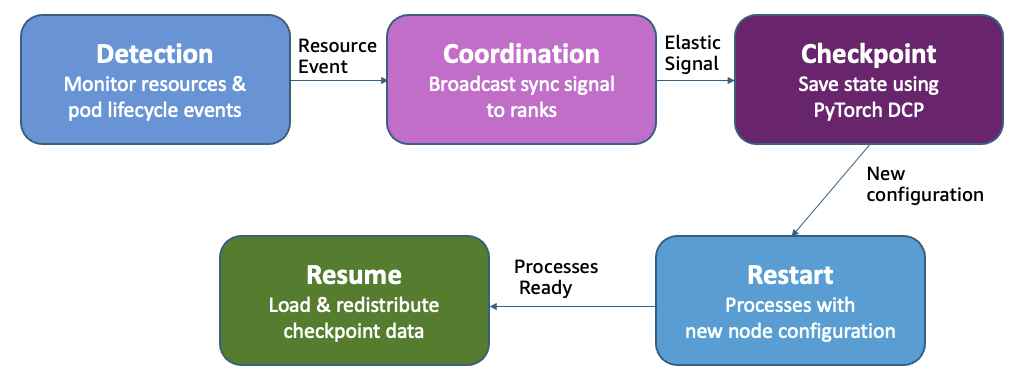


Modern AI infrastructure serves multiple concurrent workloads on the same cluster, from foundation model (FM) pre-training and fine-tuning to production inference and evaluation. In this shared environment, the demands for AI accelerators fluctuates continuously as inference workloads scale with traffic patterns, and experiments complete and release resources. Despite this dynamic availability of AI accelerators, traditional training workloads remain locked into their initial compute allocation, unable to take advantage of idle compute capacity without manual intervention.
Amazon SageMaker HyperPod now supports elastic training, enabling your machine learning (ML) workloads to automatically scale based on resource availability. In this post, we demonstrate how elastic training helps you maximize GPU utilization, reduce costs, and accelerate model development through dynamic resource adaptation, while maintain training quality and minimizing manual intervention.
How static allocation impacts infrastructure utilization
Consider a 256 GPU cluster running both training and inference workloads. During off-peak hours at night, inference may release 96 GPUs. That leaves 96 GPUs sitting idle and available to speed up training. Traditional training jobs run at a fixed scale; such jobs can’t absorb idle compute capacity. As a result, a single training job that starts with 32 GPUs gets locked at this initial configuration, while 96 additional GPUs remain idle; this translates to 2,304 wasted GPU-hours per day, representing thousands of dollars spent daily on underutilized infrastructure investment. The problem is compounded as the cluster size scales.
Scaling distributed training dynamically is technically complex. Even with infrastructure that supports elasticity, you need to halt jobs, reconfigure resources, adjust parallelization, and reshard checkpoints. This complexity is compounded by the need to maintain training progress and model accuracy throughout these transitions. Despite underlying support from SageMaker HyperPod with Amazon EKS and frameworks like PyTorch and NeMo, manual intervention can still consume hours of ML engineering time. The need to repeatedly adjust training runs based on accelerator availability distracts teams from their actual work in developing models.
Resource sharing and workload preemption add another layer of complexity. Current systems lack the ability to gracefully handle partial resource requests from higher-priority workloads. Consider a scenario where a critical fine-tuning job requires 8 GPUs from a cluster where a pre-training workload occupies all 32 GPUs. Today’s systems force a binary choice: either stop the entire pre-training job or deny resources to the higher-priority workload, even though 24 GPUs would suffice for continued pre-training at reduced scale. This limitation leads organizations to over-provision infrastructure to avoid resource contention, resulting in larger queues of pending jobs, increased costs, and reduced cluster efficiency.
Solution overview
SageMaker HyperPod now offers elastic training. Training workloads can automatically scale up to utilize available accelerators and gracefully contract when resources are needed elsewhere, all while maintaining training quality. SageMaker HyperPod manages the complex orchestration of checkpoint management, rank reassignment, and process coordination, minimizing manual intervention and helping teams focus on model development rather than infrastructure management.
The SageMaker HyperPod training operator integrates with the Kubernetes control plane and resource scheduler to make scaling decisions. It monitors pod lifecycle events, node availability, and scheduler priority signals. This lets it detect scaling opportunities almost instantly, whether from newly available resources or new requests from higher-priority workloads. Before initiating any transition, the operator evaluates potential scaling actions against configured policies (minimum and maximum node boundaries, scaling frequency limits) before initiating transitions.
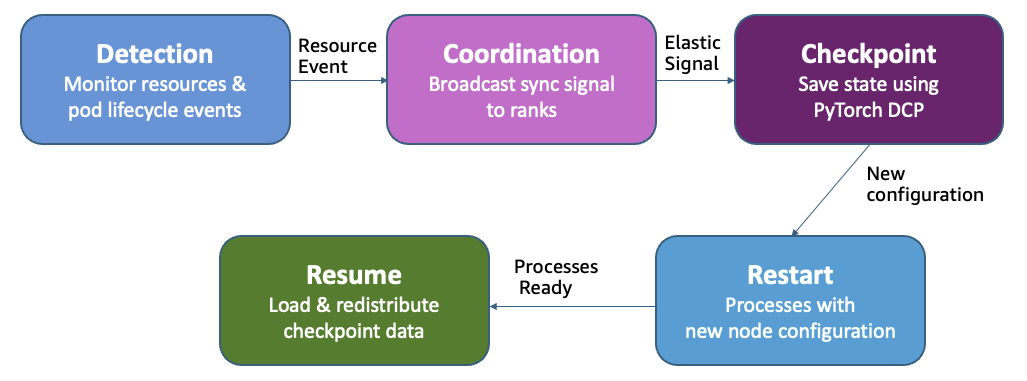
Elastic Training Scaling Event Workflow
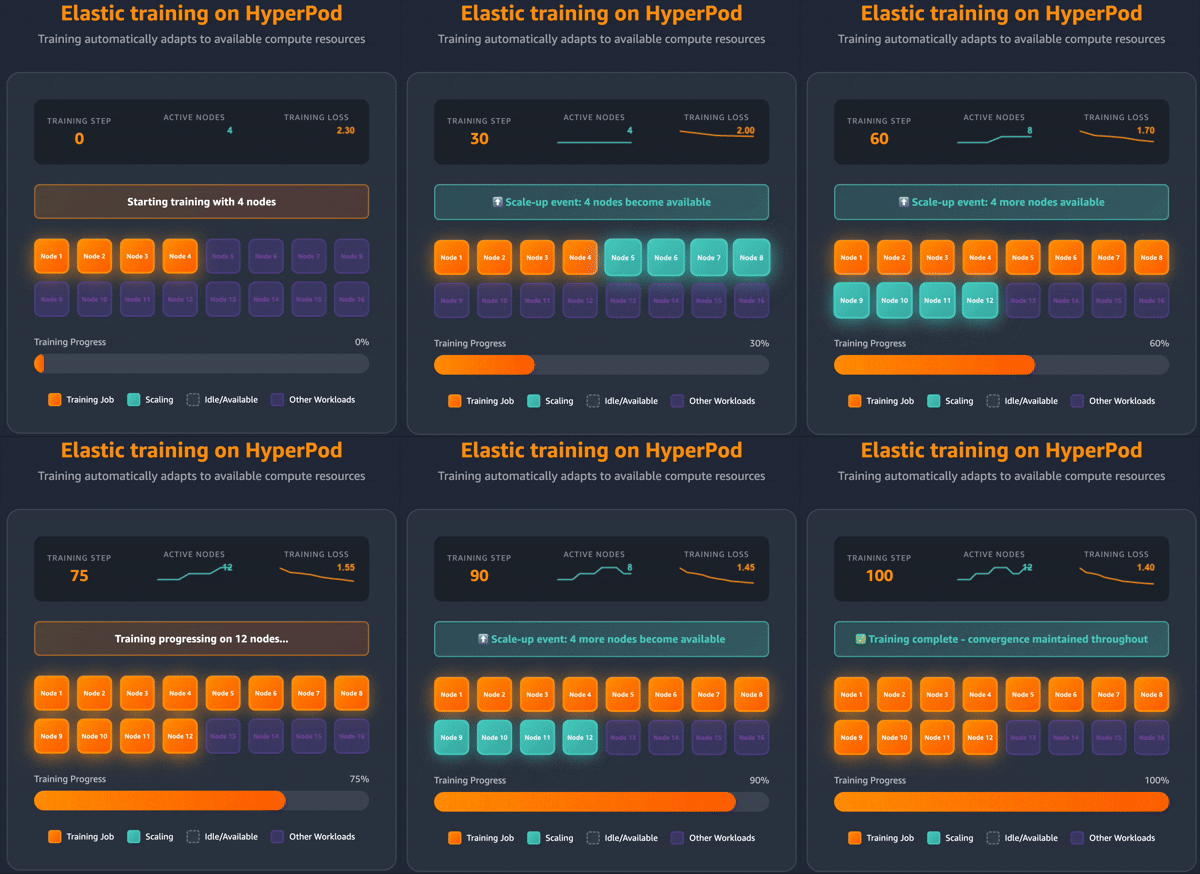
Elastic training adds or removes data parallel replicas while keeping the global batch size constant. When resources become available, new replicas join and speed up throughput without affecting convergence. When a higher-priority workload needs resources, the system removes replicas instead of killing the entire job. Training continues at reduced capacity.
When a scaling event occurs, the operator broadcasts a synchronization signal to all ranks. Each process completes its current step and saves state using PyTorch Distributed Checkpoint (DCP). As new replicas join or existing replicas depart, the operator recalculates rank assignments and initiates process restarts across the training job. DCP then loads and redistributes the checkpoint data to match the new replica count, making sure each worker has the correct model and optimizer state. Training resumes with adjusted replicas, and the constant global batch size makes sure convergence remains unaffected.
For clusters using Kueue (including SageMaker HyperPod task governance), elastic training implements intelligent workload management through multiple admission requests. The operator first requests minimum required resources with high priority, then incrementally requests additional capacity with lower priority. This approach enables partial preemption: when higher-priority workloads need resources, only the lower-priority replicas are revoked, allowing training to continue on the guaranteed baseline rather than terminating completely.
Getting started with elastic training
In the following sections, we guide you through setting up and configuring elastic training on SageMaker HyperPod.
Prerequisites
Before integrating elastic training in your training workload, ensure your environment meets the following requirements:
- SageMaker HyperPod cluster orchestrated by Amazon EKS with Kubernetes v1.32 and above. For information on creating a SageMaker HyperPod EKS cluster, see Creating a SageMaker HyperPod cluster with Amazon EKS orchestration.
- HyperPod training operator v1.2 and above installed on the cluster.
- SageMaker HyperPod task governance v1.3.1 and above for job queuing, prioritization, and scheduling.
Configure namespace isolation and resource controls
If you use cluster auto scaling (like Karpenter), set namespace-level ResourceQuotas. Without them, elastic training’s resource requests can trigger unlimited node provisioning. ResourceQuotas limit the maximum resources that jobs can request while still allowing elastic behavior within defined boundaries.
The following code is an example ResourceQuota for a namespace limited to 8 ml.p5.48xlarge instances (each instance has 8 NVIDIA H100 GPUs, 192 vCPUs, and 640 GiB memory, so 8 instances =64 GPUs, 1,536 vCPUs, and 5,120 GiB memory):
We recommend organizing workloads into separate namespaces per team or project, with AWS Identity and Access Management (IAM) role-based access control (RBAC) mappings to support proper access control and resource isolation.
Build HyperPod training container
The HyperPod training operator uses a custom PyTorch launcher from the HyperPod Elastic Agent Python package to detect scaling events, coordinate checkpoint operations, and manage the rendezvous process when the world size changes. Install the elastic agent, then replace torchrun with hyperpodrun in your launch command. For more details, see HyperPod elastic agent.
The following code is an example training container configuration:
Enable elastic scaling in training code:
Complete the following steps to enable elastic scaling in your training code:
- Add the HyperPod elastic agent import to your training script to detect when scaling events occur:
- Modify your training loop to check for elastic events after each training batch. When a scaling event is detected, your training process needs to save a checkpoint and exit gracefully, allowing the operator to restart the job with a new world size:
The key pattern here is checking for elastic_event_detected() during your training loop and returning from the training function after saving a checkpoint. This allows the training operator to coordinate the scaling transition across all workers.
- Finally, implement checkpoint save and load functions using PyTorch DCP. DCP is essential for elastic training because it automatically reshards model and optimizer states when your job resumes with a different number of replicas:
For single-epoch training scenarios where each data sample must be seen exactly once, you must persist your dataloader state across scaling events. Without this, when your job resumes with a different world size, previously processed samples may be repeated or skipped, affecting training quality. A stateful dataloader saves and restores the dataloader’s position during checkpointing, making sure training continues from the exact point where it stopped. For implementation details, refer to the stateful dataloader guide in the documentation.
Submit elastic training job
With your training container built and code instrumented, you’re ready to submit an elastic training job. The job specification defines how your training workload scales in response to cluster resource availability through the elasticPolicy configuration.
Create a HyperPodPyTorchJob specification that defines your elastic scaling behavior using the following code:
The elasticPolicy configuration controls how your training job responds to resource changes:
minReplicasandmaxReplicas: These define the scaling boundaries. Your job will always maintain at leastminReplicasand never exceedmaxReplicas, maintaining predictable resource usage.replicaIncrementStepvs.replicaDiscreteValues: Choose one approach for scaling granularity. UsereplicaIncrementStepfor uniform scaling (for example, a step of 2 means scaling to 2, 4, 6, 8 nodes). UsereplicaDiscreteValues: [2, 4, 8]to specify exact allowed configurations. This is useful when certain world sizes work better for your model’s parallelization strategy.gracefulShutdownTimeoutInSeconds: This gives your training process time to complete checkpointing before the operator forces a shutdown. Set this based on your checkpoint size and storage performance.scalingTimeoutInSeconds: This introduces a stabilization delay before scale-up to prevent thrashing when resources fluctuate rapidly. The operator waits this duration after detecting available resources before triggering a scale-up event.faultyScaleDownTimeoutInSeconds: When pods fail or crash, the operator waits this duration for recovery before scaling down. This prevents unnecessary scale-downs due to transient failures.
Elastic training incorporates anti-thrashing mechanisms to maintain stability in environments with rapidly fluctuating resource availability. These protections include enforced minimum stability periods between scaling events and an exponential backoff strategy for frequent transitions. By preventing excessive fluctuations, the system makes sure training jobs can make meaningful progress at each scale point rather than being overwhelmed by frequent checkpoint operations. You can tune these anti-thrashing policies in the elastic policy configuration, enabling a balanced approach between responsive scaling and training stability that aligns with their specific cluster dynamics and workload requirements.
You can then submit the job using kubectl or the SageMaker HyperPod CLI, as covered in documentation:
Using SageMaker HyperPod recipes
We have created SageMaker HyperPod recipes for elastic training for publicly available FMs, including Llama and GPT-OSS. These recipes provide pre-validated configurations that handle parallelization strategy, hyperparameter adjustments, and checkpoint management automatically, requiring only YAML configuration changes to specify the elastic policy with no code modifications. Teams simply specify minimum and maximum node boundaries in their job specification, and the system manages all scaling coordination as cluster resources fluctuate.
Recipes also support scale-specific configurations through the scale_config field, so you can define different hyperparameters (batch size, learning rate) for each world size. This is particularly useful when scaling requires adjusting batch distribution or enabling uneven batch sizes. For detailed examples, see the SageMaker HyperPod Recipes repository.
Performance results
To demonstrate elastic training’s impact, we fine-tuned a Llama-3 70B model on the TAT-QA dataset using a SageMaker HyperPod cluster with up to 8 ml.p5.48xlarge instances. This benchmark illustrates how elastic training performs in practice when dynamically scaling in response to resource availability, simulating a realistic environment where training and inference workloads share cluster capacity.
We evaluated elastic training across two key dimensions: training throughput and model convergence during scaling transitions. We observed a consistent improvement in throughput at different scaling configurations from 1 node to 8 nodes, as shown in the following figures. Training performance improved from 2,000 tokens/second at 1 node, and up to 14,000 tokens/second at 8 nodes. Throughout the training run, the loss continued decrease as model training continued to converge.
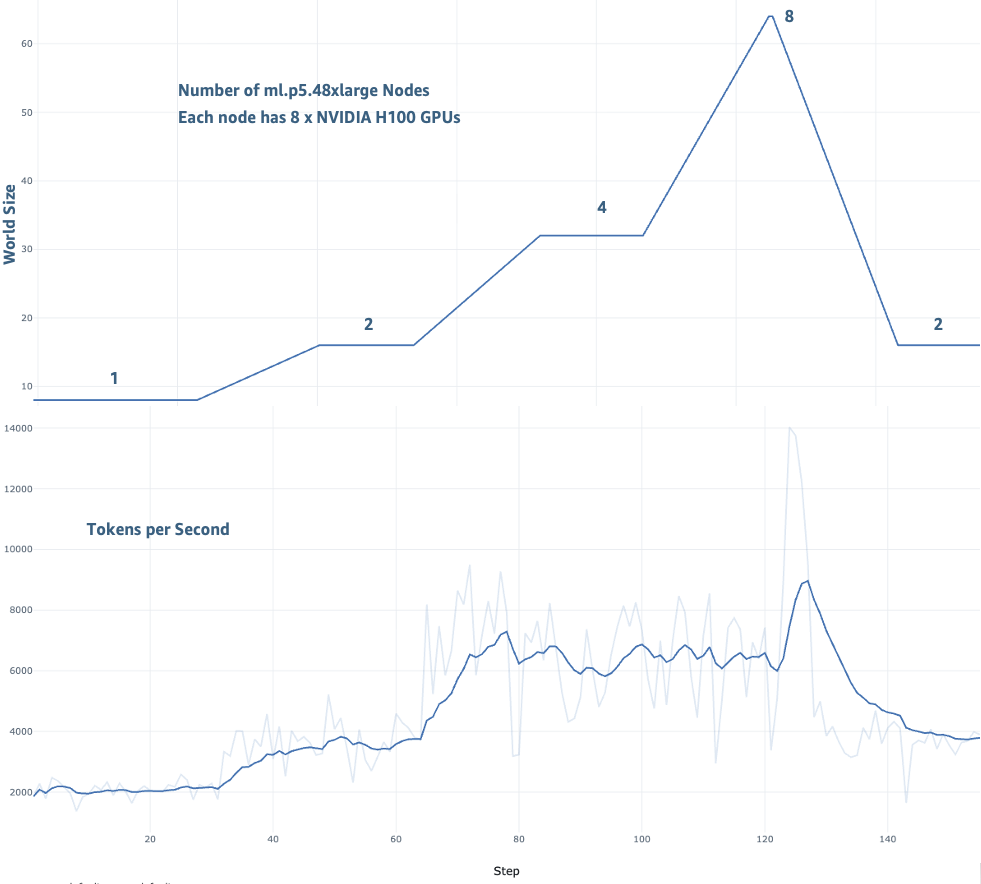
Training throughput with Elastic Training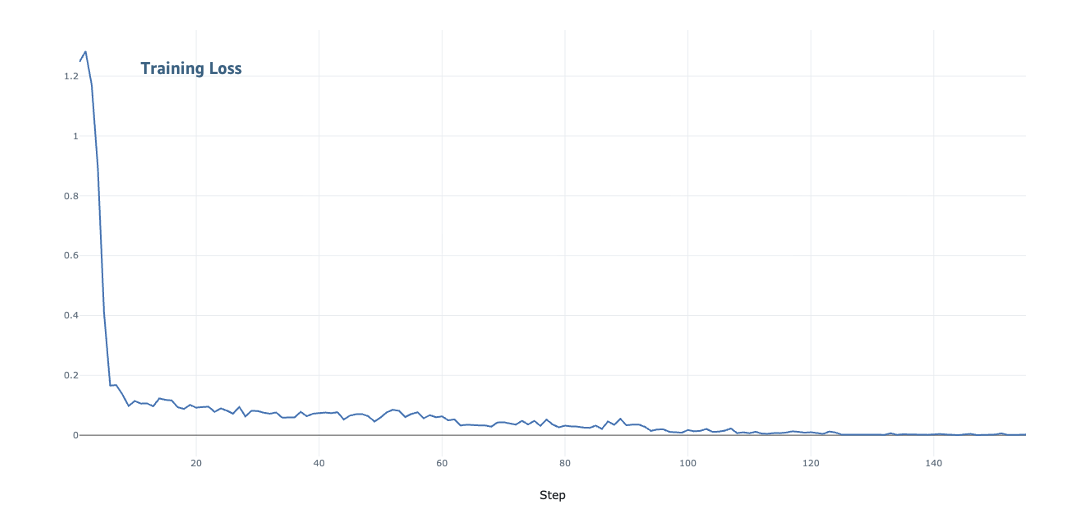
Model convergence with Elastic Training
Integration with SageMaker HyperPod capabilities
Beyond its core scaling capabilities, elastic training takes advantage of the integration with the infrastructure capabilities of SageMaker HyperPod. Task governance policies automatically trigger scaling events when workload priorities shift, enabling training to yield resources to higher-priority inference or evaluation workloads. Support for SageMaker Training Plans allows training to opportunistically scale using cost-optimized capacity types while maintaining resilience through automatic scale-down when spot instances are reclaimed. The SageMaker HyperPod observability add-on complements these capabilities by providing detailed insights into scaling events, checkpoint performance, and training progression, helping teams monitor and optimize their elastic training deployments.
Conclusion
Elastic training on SageMaker HyperPod addresses the problem of wasted resources in AI clusters. Training jobs can now scale automatically as resources become available without requiring manual infrastructure adjustments. The technical architecture of elastic training maintains training quality throughout scaling transitions. By preserving the global batch size and learning rate across different data-parallel configurations, the system maintains consistent convergence properties regardless of the current scale.
You can expect three primary benefits. First, from an operational perspective, the reduction of manual reconfiguration cycles fundamentally changes how ML teams work. Engineers can focus on model innovation and development rather than infrastructure management, significantly improving team productivity and reducing operational overhead. Second, infrastructure efficiency sees dramatic improvements as training workloads dynamically consume available capacity, leading to substantial reductions in idle GPU hours and corresponding cost savings. Third, time-to-market accelerates considerably as training jobs automatically scale to utilize available resources, enabling faster model development and deployment cycles.
To get started, refer to the documentation guide. Sample implementations and recipes are available in the GitHub repository.
About the Authors
 Roy Allela is a Senior AI/ML Specialist Solutions Architect at AWS. He helps AWS customers, from small startups to large enterprises to train and deploy foundation models efficiently on AWS. He has a background in Microprocessor Engineering passionate about computational optimization problems and improving the performance of AI workloads. You can connect with Roy on LinkedIn.
 Anirudh Viswanathan is a Senior Product Manager, Technical, at AWS with the SageMaker team, where he focuses on Machine Learning. He holds a Master’s in Robotics from Carnegie Mellon University and an MBA from the Wharton School of Business. Anirudh is a named inventor on more than 50 AI/ML patents. He enjoys long-distance running, exploring art galleries, and attending Broadway shows. You can connect with Anirudh on LinkedIn.
 Arun Kumar Lokanatha is a Senior ML Solutions Architect with the Amazon SageMaker AI. He holds a Master’s degree from UIUC with a specialization in Data science. He specializes in Generative AI workloads, helping customers build and deploy LLM’s using SageMaker HyperPod, SageMaker training jobs, and SageMaker distributed training. Outside of work, he enjoys running, hiking, and cooking.
 Oleg Talalov is a Senior Software Development Engineer at AWS, working on the SageMaker HyperPod team, where he focuses on Machine Learning and high-performance computing infrastructure for ML training. He holds a Master’s degree from Peter the Great St. Petersburg Polytechnic University. Oleg is an inventor on multiple AI/ML technologies and enjoys cycling, swimming, and running. You can connect with Oleg on LinkedIn
 Qianlin Liang is a Software Development Engineer at AWS with the SageMaker team, where he focuses on AI systems. He holds a Ph.D. in Computer Science from University of Massachusetts Amherst. His research develops system techniques for efficient and resilient machine learning. Outside of works, he enjoys running and photographing. You can connect with Qianlin on LinkedIn.
 Trevor Harvey is a Principal Specialist in Generative AI at Amazon Web Services (AWS) and an AWS Certified Solutions Architect – Professional. At AWS, Trevor works with customers to design and implement machine learning solutions and leads go-to-market strategies for generative AI services.
 Anirban Roy is a Principal Engineer at AWS with the SageMaker team, primarily focusing on AI training infra, resiliency and observability. He holds a Master’s in Computer Science from Indian Statistical Institute in Kolkata. Anirban is a seasoned distributed software system builder with more than 20 years of experience and multiple patents and publications. He enjoys road biking, reading non-fiction, gardening and nature traveling. You can connect with Anirban on LinkedIn
 Arun Nagarajan is a Principal Engineer on the Amazon SageMaker AI team, where he currently focuses on distributed training across the entire stack. Since joining the SageMaker team during its launch year, Arun has contributed to multiple products within SageMaker AI, including real-time inference and MLOps solutions. When he’s not working on machine learning infrastructure, he enjoys exploring the outdoors in the Pacific Northwest and hitting the slopes for skiing.