


Large language models (LLMs) have transformed how we interact with AI, but one size doesn’t fit at all. Out-of-the-box LLMs are trained with broad, general knowledge and improved for a wide range of use cases, but they often fall short when it comes to domain-specific tasks, proprietary workflows, or unique business requirements. Enterprise customers increasingly need specialized LLMs that deeply understand their proprietary data, business processes, and domain-specific terminology. Without customization, you’re forced to choose between accepting generic responses or settling for a middle ground with excessive context engineering. Nova Customization provides a suite of features, ranging from Amazon Bedrock customization options such as Supervised Fine-Tuning (SFT) and Reinforcement Fine Tuning (RFT) to Amazon SageMaker AI customization capabilities, including SFT, Direct Preference Optimization (DPO), RFT, along with both LoRA and full rank based customization.
As models are fine-tuned on specialized datasets, they frequently, loose some base capabilities including instruction-following abilities, reasoning skills, and broad knowledge expertise, this phenomenon is also called catastrophic forgetting. Amazon Nova Forge provides a tool to overcome this tradeoff by enabling you to build your own frontier models using Nova. Nova Forge customers can start their development from early model checkpoints, blend their datasets with Amazon Nova-curated and host their custom models securely on AWS. Sometime these customization workflows can get complex and necessitates technical, infrastructure setup, and considerable time investment making them a high barrier to entry.
To combat this issue we are launching Nova Forge SDK that makes LLM customization accessible, empowering teams to harness the full potential of language models without the challenges of dependency management, image selection, and recipe configuration and eventually lowering the barrier of entry. We view customization as a continuum within the scaling ladder, and therefore, the Nova Forge SDK supports all customization options, ranging from Amazon Bedrock all the way to Amazon SageMaker AI using Amazon Nova Forge capabilities.
Nova Forge SDK: Purpose built for developers by developers
Nova Forge SDK delivers a unified toolkit purpose-built for Nova customers and developers. It spans the complete customization lifecycle, providing solutions in one place from data preparation tooling, training job management, through model deployment. Nova Forge SDK represents an attempt to remove undifferentiated heavy lifting from LLM customization, so you can focus on experimenting. It complements the existing tools by offering workflows with intelligent defaults and guidance, while still allowing advanced users to access the full power of the underlying service SDKs when needed. This gives customers both streamlined workflows for common tasks and full flexibility for advanced use cases.
The SDK can be understood in three layers:
- Input Layer: This is the layer that you pass as the inputs, this can include RuntimeManager object (including what hardware to use, what platform to use and what IAM role to use from a permissions standpoint), along with training method, training data and any hyperparameters that you choose to override, along with the model of choice to customize.
- Customizer Layer: This is the middle layer that takes in these inputs and behind the scenes build the right recipe configurations and launches the job with the passed in input values.
- Output Layer: The output layer emits the output artifacts including Amazon CloudWatch Logs, ML Flow metrics, tensor board logs along with the final trained model artifact that can be used to either further tune the model using iterative fine tuning or deploying the model on Amazon SageMaker AI or Amazon Bedrock for inference.
The following image shows a high-level breakdown of these components.
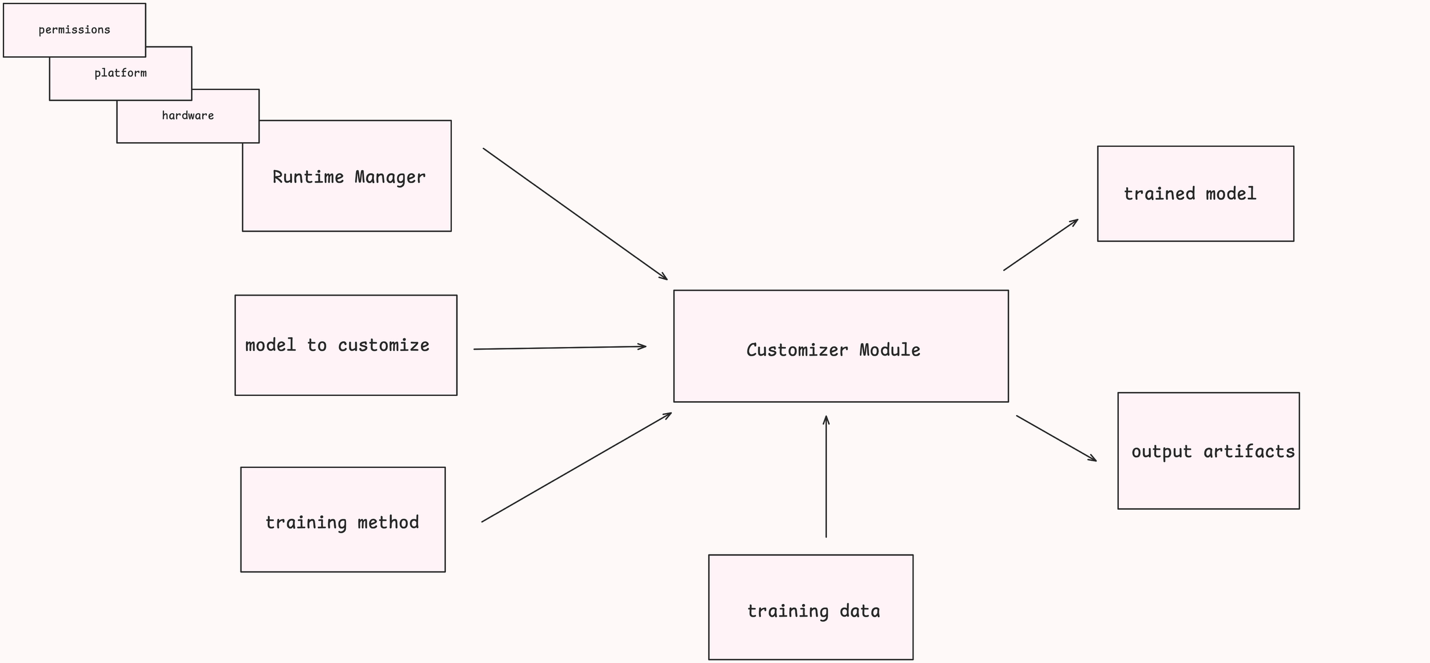
The user of the Nova Forge SDK provides a configured RuntimeManager, a model to customize, and a training method to one of the API methods in an initialized NovaModelCustomizer. The initialization of the Customizer includes specifying the location from which it can retrieve training data. This is typically an Amazon Simple Storage Service (Amazon S3) location. Based on these configurations, the Customizer model handles configuring and starting an Amazon SageMaker AI job to execute the specified task. Finally, the completed task generates output artifacts and (for the “train” API) a trained model, which you can then reference through the SDK or directly using Amazon SageMaker APIs.
Prerequisites:
Before beginning the customization workflow, make sure that you have the following setup in your environment. This blog post uses Amazon SageMaker Training Jobs (SMTJ) as the compute platform (you do not need an Amazon SageMaker HyperPod cluster to follow along)
Amazon Nova Forge setup is not required for this post, as we are reviewing the fundamental features available for Nova customization using Amazon SageMaker AI.
Note: If you are only interested in Amazon SageMaker Training Jobs, you can skip the Amazon SageMaker HyperPod setup entirely.
AWS Account and CLI
You will need an AWS account. If you don’t have one, follow the sign-up instructions.
Afterwards, follow the instructions to install the AWS Command Line Interface (AWS CLI) and configure it with your credentials. This is used for the initial API calls used for the setup, and the AWS CLI credential chain is shared by the Nova Forge SDK.
Finally, follow the public documentation to set up your access to the SageMaker AI platform, which the Nova Forge SDK uses to give you access to Amazon Nova models and customization capabilities.
IAM roles
You must create two IAM roles to work with the Nova Forge SDK, the User role, and the Execution role. The Nova Forge SDK validates both roles during execution to make sure that they have the minimum required permissions, however, we recommend that you complete the following setup steps:
- User role — the role you assume on your machine when running the SDK and the AWS CLI. This role needs permissions for Amazon SageMaker AI (CreateTrainingJob, DescribeTrainingJob), Amazon S3 (read/write to your data bucket), Amazon CloudWatch Logs (read), and IAM (PassRole). See the SDK documentation for the full policy.
- Execution role — the role that Amazon SageMaker AI assumes to run training jobs on your behalf. Its trust policy must allow sagemaker.amazonaws.com to assume it. For the full set of recommended permissions, see the SageMaker execution role documentation. Follow the prerequisites to run SMTJ jobs for detailed setup instructions.
Service quotas
This post uses ml.p5.48xlarge instances for both training and evaluation. Nova Lite 2.0 requires a minimum of 4 instances for SFT training; if you are running training and evaluation jobs concurrently, you might need at least 5 instances.
Request sufficient quotas for ml.p5.48xlarge for training job usage through the Service Quotas console for Amazon SageMaker Training Jobs.
S3 Bucket
Create an Amazon Simple Storage Service (Amazon S3) bucket in the same AWS Region as your training jobs (we use us-east-1 throughout this post) and make sure that your user and execution IAM roles have read and write access to the bucket. This is where we will store training data and output artifacts for this post.
Amazon SageMaker HyperPod (Optional)
In addition to Amazon SageMaker Training Jobs (SMTJ), the Nova Forge SDK also supports running jobs on Amazon SageMaker HyperPod (SMHP). While this post does not focus on SMHP customization, if you want to run training on SMHP you must set up an Amazon SageMaker HyperPod cluster with Restricted Instance Groups (RIGs) to work with Amazon Nova models.
Follow the instructions in the HyperPod RIG setup workshop to set up a cluster with RIGs suitable for Amazon Nova customization.
Setting up the Nova Forge SDK
After you are done with prerequisites, you can use the following guidance to get your environment set up to start using Nova Forge SDK.
Python environment
The Nova Forge SDK requires Python 3.12 or later. We recommend creating a virtual environment to isolate dependencies and avoid conflicts with other packages in your system:
Install the SDK
You can install the SDK with the following Pip command:
Verify the installation by importing the key modules in a sample Python file:
The following are brief descriptions of each of these modules:
- NovaModelCustomizer: The primary class for interacting with the Nova Forge SDK. It contains the core methods for the API and is used to initialize much of the training configuration.
- SMTJRuntimeManager: Manages the AWS infrastructure required for SMTJ. customization, such as the selected instance type and count for a customization job.
- TrainingMethod: An Enum of the possible training types, which can be used to configure a NovaModelCustomizer.
- EvaluationTask: An Enum of the possible evaluation types, which can be used to configure a NovaModelCustomizer.
- CSVDatasetLoader: Used to load data from CSV files for use in the Nova Forge SDK.
- Model: An Enum of the Amazon Nova models supported by the Nova Forge SDK.
Note: For more information about the different functionalities of the SDK, see the specification document. If you use an LLM agent for coding work, you can have it review the AGENTS.md file in the repository to teach it about the SDK.
Conclusion
The SDK’s unified interface abstracts the complexity of data formatting and platform-specific configurations so that developers can focus on what matters: their data, their domain, and their business objectives. Whether you’re starting with fine-tuning on Amazon SageMaker Training Jobs or planning to run customization with Amazon SageMaker Hyperpod, the SDK provides a consistent experience across the entire customization continuum.
By removing the traditional barriers to LLM customization, technical expertise requirements, and time investment, the Nova Forge SDK empowers organizations to build models that truly understand their unique context without sacrificing the general capabilities that make foundation models valuable. The SDK handles configuring compute resources, orchestrating the entire customization pipeline, monitoring training jobs, and deploying endpoints. The result is enterprise AI that’s both specialized and intelligent, domain-expert and broadly capable.
Ready to customize your own Nova models? Get started with the Nova Forge SDK on GitHub and explore the full documentation to begin building models tailored to your enterprise needs.