


AI agents are rapidly evolving from mere chat interfaces into sophisticated autonomous workers that handle complex, time-intensive tasks. As organizations deploy agents to train machine learning (ML) models, process large datasets, and run extended simulations, the Model Context Protocol (MCP) has emerged as a standard for agent-server integrations. But a critical challenge remains: these operations can take minutes or hours to complete, far exceeding typical session timeframes. By using Amazon Bedrock AgentCore and Strands Agents to implement persistent state management, you can enable seamless, cross-session task execution in production environments. Imagine your AI agent initiating a multi-hour data processing job, your user closing their laptop, and the system seamlessly retrieving completed results when the user returns days later—with full visibility into task progress, outcomes, and errors. This capability transforms AI agents from conversational assistants into reliable autonomous workers that can handle enterprise-scale operations. Without these architectural patterns, you’ll encounter timeout errors, inefficient resource utilization, and potential data loss when connections terminate unexpectedly.
In this post, we provide you with a comprehensive approach to achieve this. First, we introduce a context message strategy that maintains continuous communication between servers and clients during extended operations. Next, we develop an asynchronous task management framework that allows your AI agents to initiate long-running processes without blocking other operations. Finally, we demonstrate how to bring these strategies together with Amazon Bedrock AgentCore and Strands Agents to build production-ready AI agents that can handle complex, time-intensive operations reliably.
Common approaches to handle long-running tasks
When designing MCP servers for long-running tasks, you might face a fundamental architectural decision: should the server maintain an active connection and provide real-time updates, or should it decouple task execution from the initial request? This choice leads to two distinct approaches: context messaging and async task management.
Using context messaging
The context messaging approach maintains continuous communication between the MCP server and client throughout task execution. This is achieved by using MCP’s built-in context object to send periodic notifications to the client. This approach is optimal for scenarios where tasks are typically completed within 10–15 minutes and network connectivity remains stable. The context messaging approach offers these advantages:
- Straightforward implementation
- No additional polling logic required
- Straightforward client implementation
- Minimal overhead
Using async task management
The async task management approach separates task initiation from execution and result retrieval. After executing the MCP tool, the tool immediately returns a task initiation message while executing the task in the background. This approach excels in demanding enterprise scenarios where tasks might run for hours, users need flexibility to disconnect and reconnect, and system reliability is paramount. The async task management approach provides these benefits:
- True fire-and-forget operation
- Safe client disconnection while tasks continue processing
- Data loss prevention through persistent storage
- Support for long-running operations (hours)
- Resilience against network interruptions
- Asynchronous workflows
Context messaging
Let’s begin by exploring the context messaging approach, which provides a straightforward solution for handling moderately long operations while maintaining active connections. This approach builds directly on existing capabilities of MCP and requires minimal additional infrastructure, making it an excellent starting point for extending your agent’s processing time limits. Imagine you’ve built an MCP server for an AI agent that helps data scientists train ML models. When a user asks the agent to train a complex model, the underlying process might take 10–15 minutes—far beyond the typical 30-second to 2-minute HTTP timeout limit in most environments. Without a proper strategy, the connection would drop, the operation would fail, and the user would be left frustrated. In a Streamable HTTP transport for MCP client implementation, these timeout constraints are particularly limiting. When task execution exceeds the timeout limit, the connection aborts and the agent’s workflow interrupts. This is where context messaging comes in. The following diagram illustrates the workflow when implementing the context messaging approach. Context messaging uses the built-in context object of MCP to send periodic signals from the server to the MCP client, effectively keeping the connection alive throughout longer operations. Think of it as sending “heartbeat” messages that help prevent the connection from timing out.
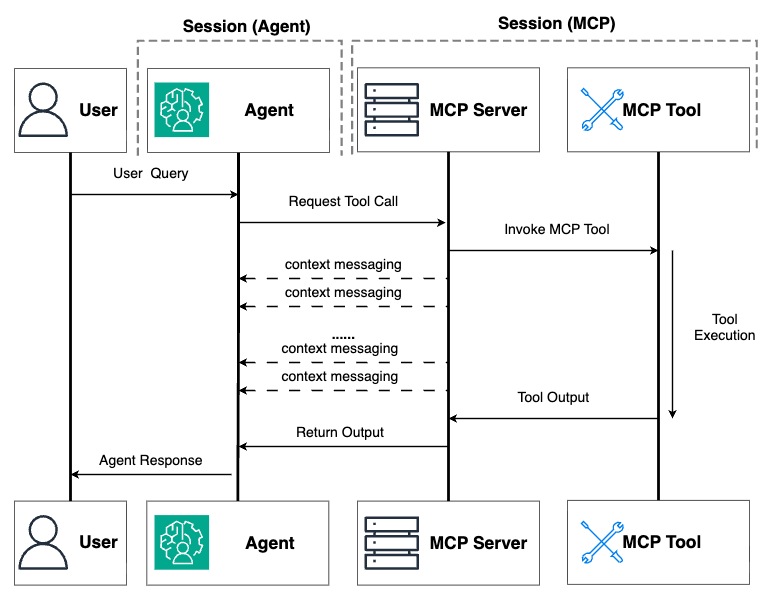
Figure 1: Illustration of workflow in context messaging approach
Here is a code example to implement the context messaging:
The key element here is the Context parameter in the tool definition. When you include a parameter with the Context type annotation, FastMCP automatically injects this object, giving you access to methods such as ctx.info() and ctx.report_progress(). These methods send messages to the connected client without terminating tool execution.
The report_progress() calls within the training loop serve as those critical heartbeat messages, making sure the MCP connection remains active throughout the extended processing period.
For many real-world scenarios, exact progress can’t be easily quantified—such as when processing unpredictable datasets or making external API calls. In these cases, you can implement a time-based heartbeat system:
This pattern creates an asynchronous timer that runs alongside your main task, sending regular status updates every few seconds. Using asyncio.Event() for coordination facilitates clean shutdown of the timer when the main work is completed.
When to use context messaging
Context messaging works best when:
- Tasks take 1–15 minutes to complete*
- Network connections are generally stable
- The client session can remain active throughout the operation
- You need real-time progress updates during processing
- Tasks have predictable, finite execution times with clear termination conditions
*Note: “15 minutes” is based on the maximum time for synchronous requests Amazon Bedrock AgentCore offered. More details about Bedrock AgentCore service quotas can be found at Quotas for Amazon Bedrock AgentCore. If the infrastructure hosting the agent doesn’t implement hard time limits, be extremely cautious when using this approach for tasks that might potentially hang or run indefinitely. Without proper safeguards, a stuck task could maintain an open connection indefinitely, leading to resource depletion, unresponsive processes, and potentially system-wide stability issues.
Here are some important limitations to consider:
- Continuous connection required – The client session must remain active throughout the entire operation. If the user closes their browser or the network drops, the work is lost.
- Resource consumption – Keeping connections open consumes server and client resources, potentially increasing costs for long-running operations.
- Network dependency – Network instability can still interrupt the process, requiring a full restart.
- Ultimate timeout limits – Most infrastructures have hard timeout limits that can’t be circumvented with heartbeat messages.
Therefore, for truly long-running operations that might take hours or for scenarios where users need to disconnect and reconnect later, you’ll need the more robust asynchronous task management approach.
Async task management
Unlike the context messaging approach where clients must maintain continuous connections, the async task management pattern follows a “fire and forget” model:
- Task initiation – Client makes a request to start a task and immediately receives a task ID
- Background processing – Server executes the work asynchronously, with no client connection required
- Status checking – Client can reconnect whenever to check progress using the task ID
- Result retrieval – When they’re completed, results remain available for retrieval whenever the client reconnects
The following figure illustrates the workflow in the asynchronous task management approach.
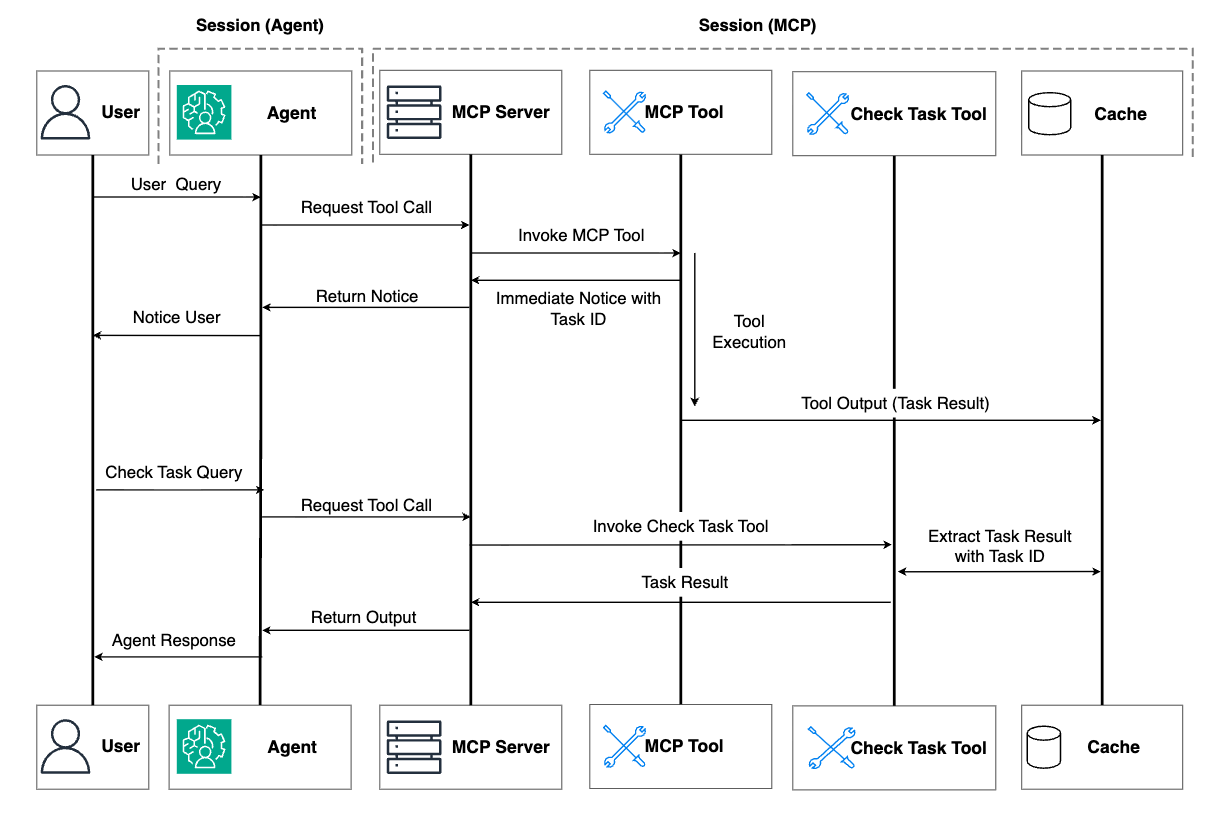
Figure 2: Illustration of workflow in asynchronous task management approach
This pattern mirrors how you interact with batch processing systems in enterprise environments—submit a job, disconnect, and check back later when convenient. Here’s a practical implementation that demonstrates these principles:
This implementation creates a task management system with three distinct MCP tools:
model_training()– The entry point that initiates a new task. Rather than performing the work directly, it:- Generates a unique task identifier using Universally Unique Identifier (UUID)
- Creates an initial task record in the storage dictionary
- Launches the actual processing as a background task using
asyncio.create_task() - Returns immediately with the task ID, allowing the client to disconnect
check_task_status()– Allows clients to monitor progress at their convenience by:- Looking up the task by ID in the storage dictionary
- Returning current status and progress information
- Providing appropriate error handling for missing tasks
get_task_results()– Retrieves completed results when ready by:- Verifying the task exists and is completed
- Returning the results stored during background processing
- Providing clear error messages when results aren’t ready
The actual work happens in the private _execute_model_training() function, which runs independently in the background after the initial client request is completed. It updates the task’s status and progress in the shared storage as it progresses, making this information available for subsequent status checks.
Limitations to consider
Although the async task management approach helps solve connectivity issues, it introduces its own set of limitations:
- User experience friction – The approach requires users to manually check task status, remember task IDs across sessions, and explicitly request results, increasing interaction complexity.
- Volatile memory storage – Using in-memory storage (as in our example) means the tasks and results are lost if the server restarts, making the solution unsuitable for production without persistent storage.
- Serverless environment constraints – In ephemeral serverless environments, instances are automatically terminated after periods of inactivity, causing the in-memory task state to be permanently lost. This creates a paradoxical situation where the solution designed to handle long-running operations becomes vulnerable to the exact duration it aims to support. Unless users maintain regular check-ins to help prevent session time limits, both tasks and results could vanish.
Moving toward a robust solution
To address these critical limitations, you need to include external persistence that survives both server restarts and instance terminations. This is where integration with dedicated storage services becomes essential. By using external agent memory storage systems, you can fundamentally change where and how task information is maintained. Instead of relying on the MCP server’s volatile memory, this approach uses persistent external agent memory storage services that remain available regardless of server state.
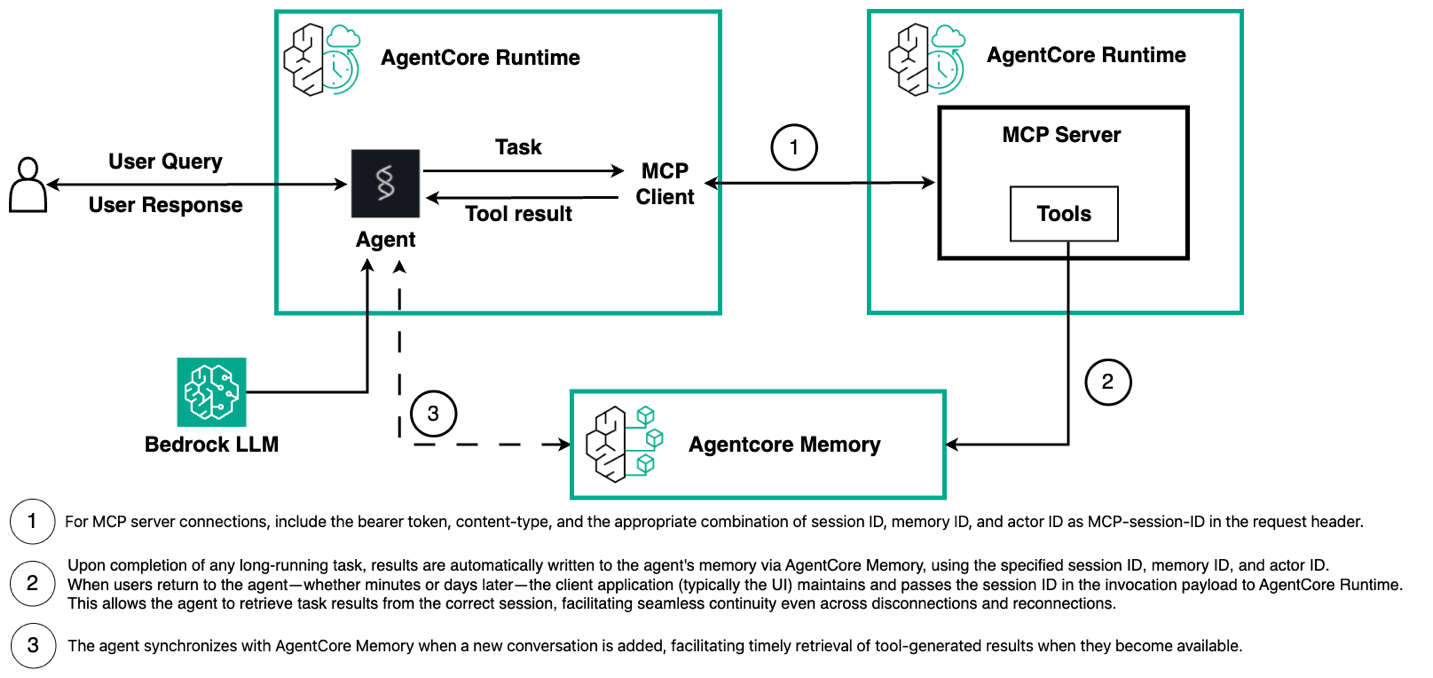
The key innovation in this enhanced approach is that when the MCP server runs a long-running task, it writes the interim or final results directly into external memory storage, such as Amazon Bedrock AgentCore Memory that the agent can access, as illustrated in the following figure. This helps create resilience against two types of runtime failures:
- The instance running the MCP server can be terminated due to inactivity after task completion
- The instance hosting the agent itself can be recycled in ephemeral serverless environments
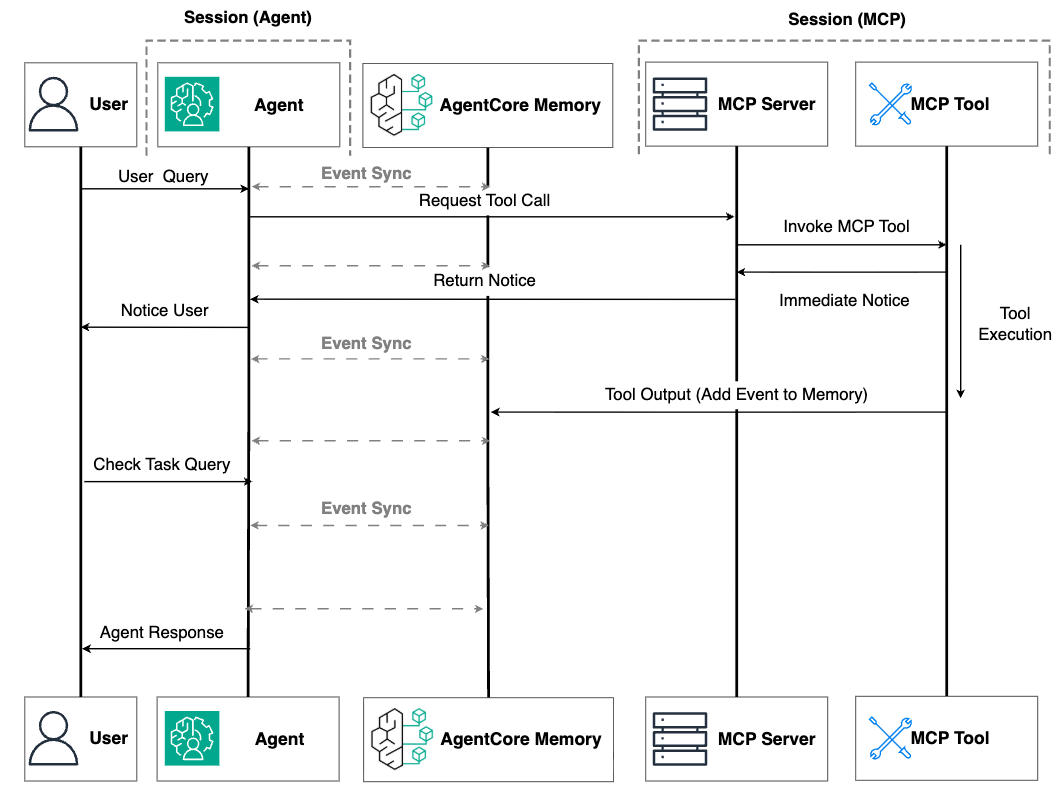
Figure 3. MCP integration with external memory
With external memory storage, when users return to interact with the agent—whether minutes, hours, or days later—the agent can retrieve the completed task results from persistent storage. This approach minimizes runtime dependencies: even if both the MCP server and agent instances are terminated, the task results remain safely preserved and accessible when needed.
The next section will explore how to implement this robust solution using Amazon Bedrock AgentCore Runtime as a serverless hosting environment, AgentCore Memory for persistent agent memory storage, and the Strands Agents framework to orchestrate these components into a cohesive system that maintains task state across session boundaries.
Amazon Bedrock AgentCore and Strands Agents implementation
Before diving into the implementation details, it’s important to understand the deployment options available for MCP servers on Amazon Bedrock AgentCore. There are two primary approaches: Amazon Bedrock AgentCore Gateway and AgentCore Runtime. AgentCore Gateway has a 5-minute timeout for invocations, making it unsuitable for hosting MCP servers that provide tools requiring extended response times or long-running operations. AgentCore Runtime offers significantly more flexibility with a 15-minute request timeout (for synchronous requests) and adjustable maximum session duration (for asynchronous processes; the default duration is 8 hours) and idle session timeout. Although you could host an MCP server in a traditional serverful environment for unlimited execution time, AgentCore Runtime provides an optimal balance for most production scenarios. You gain serverless benefits such as automatic scaling, pay-per-use pricing, and no infrastructure management, while the adjustable maximums session duration covers most real-world long running tasks—from data processing and model training to report generation and complex simulations. You can use this approach to build sophisticated AI agents without the operational overhead of managing servers while reserving serverful deployments only for the rare cases that genuinely require multiday executions. For more information about AgentCore Runtime and AgentCore Gateway service quotas, refer to Quotas for Amazon Bedrock AgentCore.
Next, we walk through the implementation, which is illustrated in the following diagram. This implementation consists of two interconnected components: the MCP server that executes long-running tasks and writes results to AgentCore Memory, and the agent that manages the conversation flow and retrieves those results when needed. This architecture creates a seamless experience where users can disconnect during lengthy processes and return later to find their results waiting for them.
MCP server implementation
Let’s examine how our MCP server implementation uses AgentCore Memory to achieve persistence:
The implementation relies on two key components that enable persistence and session management.
- The
agentcore_memory_client.create_event()method serves as the bridge between tool execution and persistent memory storage. When a background task is completed, this method saves the results directly to the agent’s memory in AgentCore Memory using the specified memory ID, actor ID, and session ID. Unlike traditional approaches where results might be stored temporarily or require manual retrieval, this integration enables task outcomes to become permanent parts of the agent’s conversational memory. The agent can then reference these results in future interactions, creating a continuous knowledge-building experience across multiple sessions. - The second crucial component involves extracting session context through
ctx.request_context.request.headers.get("mcp-session-id", ""). The"Mcp-Session-Id"is part of standard MCP protocol. You can use this header to pass a composite identifier containing three essential pieces of information in a delimited format:session_id@@@memory_id@@@actor_id. This approach allows our implementation to retrieve the necessary context identifiers from a single header value. Headers are used instead of environment variables by necessity—these identifiers change dynamically with each conversation, whereas environment variables remain static from container startup. This design choice is particularly important in multi-tenant scenarios where a single MCP server simultaneously handles requests from multiple users, each with their own distinct session context.
Another important aspect in this example involves proper message formatting when storing events. Each message saved to AgentCore Memory requires two components: the content and a role identifier. These two components need to be formatted in a way that the agent framework can be recognized. Here is an example for Strands Agents framework:
The content is an inner JSON object (serialized with json.dumps()) that contains the message details, including role, text content, and message ID. The outer role identifier (USER in this example) helps AgentCore Memory categorize the message source.
Strands Agents implementation
Integrating Amazon Bedrock AgentCore Memory with Strands Agents is remarkably straightforward using the AgentCoreMemorySessionManager class from the Bedrock AgentCore SDK. As shown in the following code example, implementation requires minimal configuration—create an AgentCoreMemoryConfig with your session identifiers, initialize the session manager with this config, and pass it directly to your agent constructor. The session manager transparently handles the memory operations behind the scenes, maintaining conversation history and context across interactions while organizing memories using the combination of session_id, memory_id, and actor_id. For more information, refer to AgentCore Memory Session Manager.
The session context management is particularly elegant here. The agent receives session identifiers through the payload and context parameters supplied by AgentCore Runtime. These identifiers form a crucial contextual bridge that connects user interactions across multiple sessions. The session_id can be extracted from the context object (generating a new one if needed), and the memory_id and actor_id can be retrieved from the payload. These identifiers are then packaged into a custom HTTP header (Mcp-Session-Id) that’s passed to the MCP server during connection establishment.
To maintain this persistent experience across multiple interactions, clients must consistently provide the same identifiers when invoking the agent:
By consistently providing the same memory_id, actor_id, and runtimeSessionId across invocations, users can create a continuous conversational experience where task results persist independently of session boundaries. When a user returns days later, the agent can automatically retrieve both conversation history and the task results that were completed during their absence.
This architecture represents a significant advancement in AI agent capabilities—transforming long-running operations from fragile, connection-dependent processes into robust, persistent tasks that continue working regardless of connection state. The result is a system that can deliver truly asynchronous AI assistance, where complex work continues in the background and results are seamlessly integrated whenever the user returns to the conversation.
Conclusion
In this post, we’ve explored practical ways to help AI agents handle tasks that take minutes or even hours to complete. Whether using the more straightforward approach of keeping connections alive or the more advanced method of injecting task results to agent’s memory, these techniques enable your AI agent to tackle valuable complex work without frustrating time limits or lost results.
We invite you to try these approaches in your own AI agent projects. Start with context messaging for moderate tasks, then move to async management as your needs grow. The solutions we’ve shared can be quickly adapted to your specific needs, helping you build AI that delivers results reliably—even when users disconnect and return days later. What long-running tasks could your AI assistants handle better with these techniques?
To learn more, see the Amazon Bedrock AgentCore documentation and explore our sample notebook.
About the Authors
 Haochen Xie is a Senior Data Scientist at AWS Generative AI Innovation Center. He is an ordinary person.
 Flora Wang is an Applied Scientist at AWS Generative AI Innovation Center, where she works with customers to architect and implement scalable Generative AI solutions that address their unique business challenges. She specializes in model customization techniques and agent-based AI systems, helping organizations harness the full potential of generative AI technology.
 Yuan Tian is an Applied Scientist at the AWS Generative AI Innovation Center, where he works with customers across diverse industries—including healthcare, life sciences, finance, and energy—to architect and implement generative AI solutions such as agentic systems. He brings a unique interdisciplinary perspective, combining expertise in machine learning with computational biology.
 Hari Prasanna Das is an Applied Scientist at the AWS Generative AI Innovation Center, where he works with AWS customers across different verticals to expedite their use of Generative AI. Hari holds a PhD in Electrical Engineering and Computer Sciences from the University of California, Berkeley. His research interests include Generative AI, Deep Learning, Computer Vision, and Data-Efficient Machine Learning.