In this first post in a two-part series, we examine how retailers can implement a virtual try-on to improve customer experience. In part 2, we will further explore real-world applications and benefits of this innovative technology.
Every fourth piece of clothing bought online is returned to the retailer, feeding into America’s $890 billion returns problem in 2024. Behind these numbers lies a simple truth: shoppers can’t judge fit and style through their screens. Among the top reasons for returned fashion items are poor fit, wrong size, or style mismatch.
Retailers face a critical challenge in that their most valuable customers often return the most items, forcing them to maintain generous return policies despite steep processing costs and environmental impact. Each return produces 30% more carbon emissions than the initial delivery and represents a missed sales opportunity until items are processed back into inventory. As digital shopping accelerates, virtual try-on technology has emerged as a solution to reduce returns while maintaining customer convenience, but early implementations struggled with accuracy, scalability, and preserving crucial details such as garment draping, patterns, and logos.
Amazon Nova Canvas addresses these challenges through its virtual try-on capability, which uses two two-dimensional image inputs: a source image showing a person or living space and a reference image of the product. The system offers both automatic product placement through auto-masking functionality and manual controls for precise adjustments. Throughout the process, it carefully preserves important details such as logos and textures while providing comprehensive styling controls for customization.
Virtual try-on can be deployed across multiple customer engagement channels, from ecommerce websites and mobile shopping apps to in-store kiosks, social media shopping platforms, and virtual showrooms. Imagine visiting an ecommerce website, uploading your personal image, and seeing it applied across the clothing and accessory products on that website.
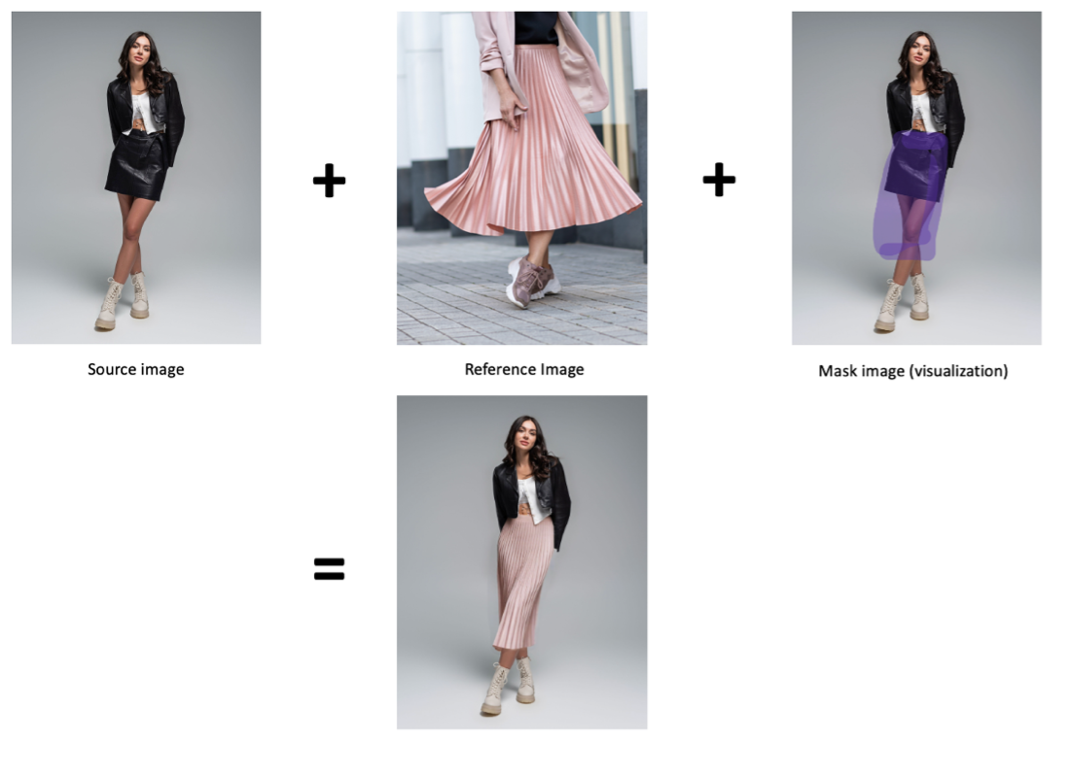
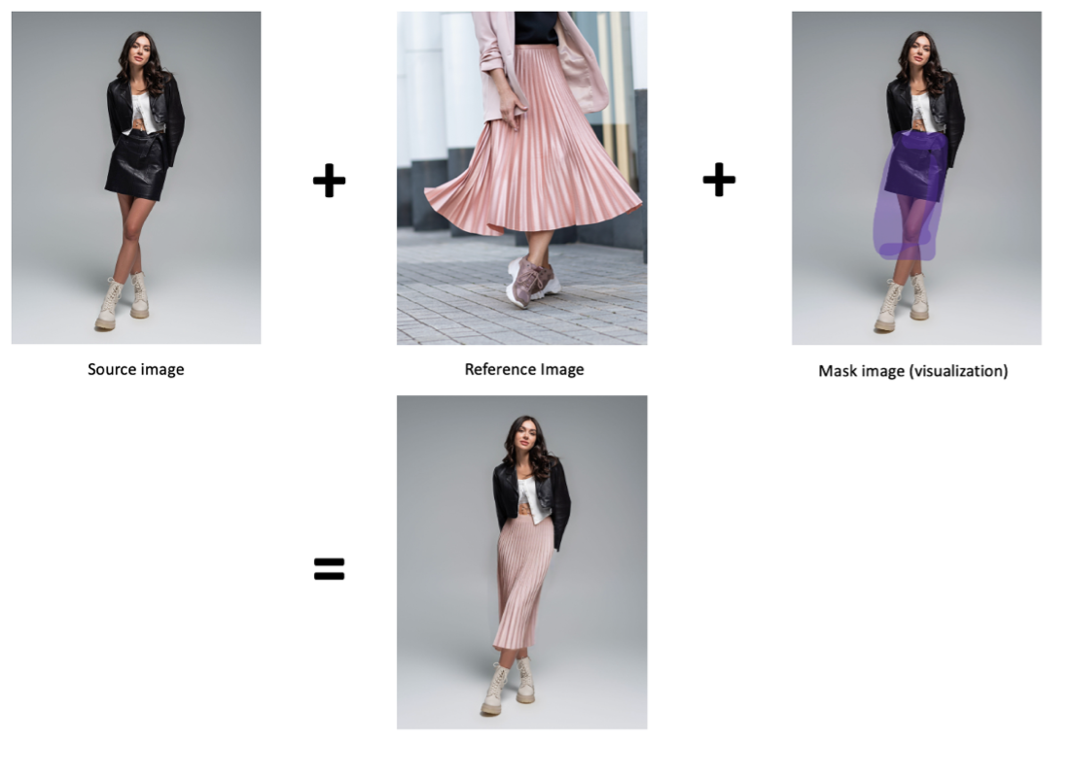
The following image shows a source image, a reference image, a mask image, and the resulting try-on image.
In this post, we explore the virtual try-on capability now available in Amazon Nova Canvas, including sample code to get started quickly and tips to help get the best outputs.
Solution overview
With virtual try-on capability, retailers and ecommerce companies can integrate garment and product visualization directly into their existing or new customer touch points. Using only a photo upload and product selection, customers can see how items would look on themselves, a model, or other placement. You can experiment with virtual try-on in Amazon Nova Canvas within the Amazon Bedrock playground. And, we’ll guide you through implementing a complete solution around this feature in your own Amazon Web Services (AWS) environment. The following section provides detailed instructions and best practices for deployment.
At its core, the solution uses the new virtual try-on in Amazon Nova Canvas in Amazon Bedrock. This model offers fast inference speeds, making it suitable for real-time applications such as ecommerce. At the same time, it preserves high-fidelity details of reference items, including patterns, textures, and logos. The model maintains accurate semantic manipulations within scenes.
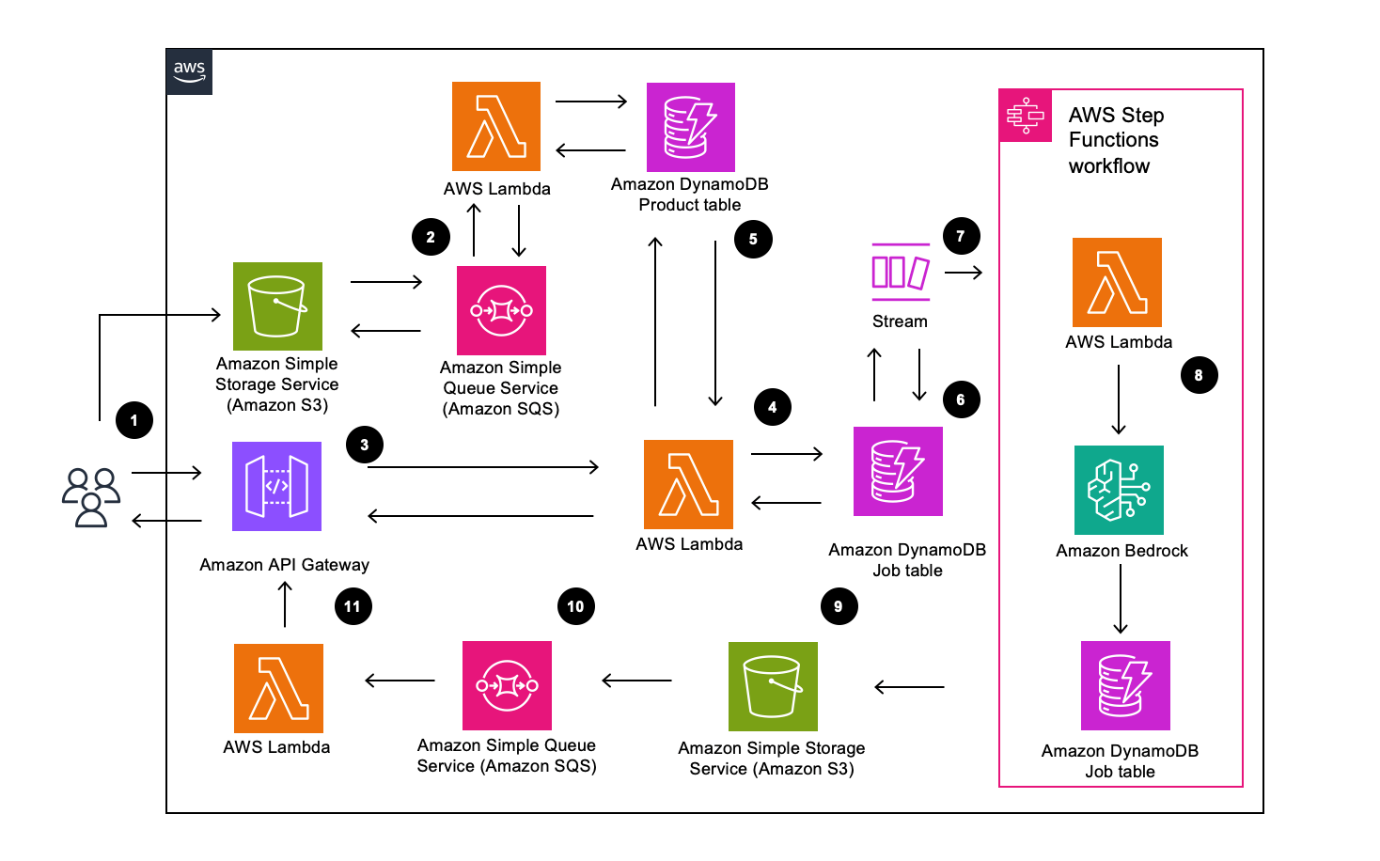
Our solution combines AWS serverless services with AI processing capabilities in an event-driven architecture. Amazon DynamoDB Streams triggers an AWS Step Functions workflow and Amazon Simple Storage Service (Amazon S3) events to manage result delivery. Amazon Nova Canvas in Amazon Bedrock manages both the mask generation and pose detection. The solution follows an asynchronous processing pipeline with real-time status updates in which WebSocket connections maintain real-time communication with clients, enabling continuous user engagement throughout the process. For detailed implementation guidance and best practices, refer to our guidance.
Detailed explanation of the architecture
The request initiation follows this flow:
- Amazon S3 stores the uploaded customer model photos and product images.
- Each upload generates a message sent to an Amazon Simple Queue Service (Amazon SQS) queue. The AWS Lambda function creates the corresponding metadata and S3 path and stores it in the DynamoDB product table for later retrieval.
- Amazon API Gateway manages the WebSocket connections for real-time status updates between the client and the virtual try-on.
- Lambda processes initial requests by retrieving product information in the DynamoDB product table and creating job entries in DynamoDB.
- Amazon DynamoDB: The products table (
vto-products) stores catalog items available for the virtual try-on, notably the Amazon S3 picture location. - The virtual try-on jobs DynamoDB table (
vto-jobs) tracks the state of each try-on request.
The virtual try-on generation follows this flow:
- DynamoDB Streams asynchronously triggers AWS Step Functions workflows on job creation for processing try-on requests.
- AWS Step Functions orchestrates the virtual try-on generation. It triggers a Lambda function that calls the Amazon Nova Canvas model through Amazon Bedrock. The DynamoDB job table is updated with the virtual try-on status.
The result delivery follows this flow:
- Amazon S3 stores the generated try-on images with job ID metadata.
- Amazon SQS handles S3 event notifications for completed try-on images.
- AWS Lambda function sends the Amazon S3 URL of the result back to the user through WebSocket.
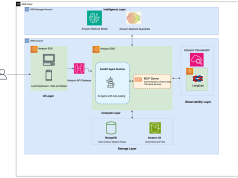
The following diagram illustrates the solution architecture.
Solution process
This section explains the end-to-end process of the solution. The solution guidance provides further details and information on how you can replicate the solution.
When your customer initiates a try-on request, they first sign in on Amazon Cognito and then upload their photo(s) stored into Amazon S3. A workflow is available to auto populate the product table in DynamoDB through Amazon S3 events. The client establishes a WebSocket connection through API Gateway, creating a persistent channel for real-time updates. The client sends the ID of the product they want to virtually try as well as the S3 URL of the static model they want to use. A Lambda function processes this request by retrieving the product image URL from DynamoDB and creating a job entry with both image URLs, returning a unique job ID for tracking.
DynamoDB stream then triggers a step function to coordinate the different writes and updates in the DynamoDB table. The step function also invokes Amazon Nova Canvas virtual try-on feature. The model takes as input (1) the source image, which is the base image you would like to modify (for example, the image of the customer), (2) the reference image, which is an image containing the product(s) you want to insert into the base image. For garments, the reference image can contain garments on or off body and can even contain multiple products representing distinct outfit components (such as a shirt, pants, and shoes in a single image).
By default, a mask is computed automatically using auxiliary inputs (maskType: "GARMENT" or maskType: "PROMPT"). The mask image can either be provided directly by the developer (maskType: "IMAGE").
When a mask type of “GARMENT” is specified, Amazon Nova Canvas will create a garment-aware mask based on a garmentClass input parameter value you specify. In most cases, you will use one of the following high-level garment classes:
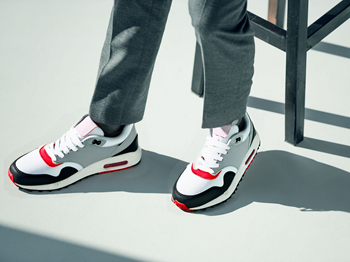
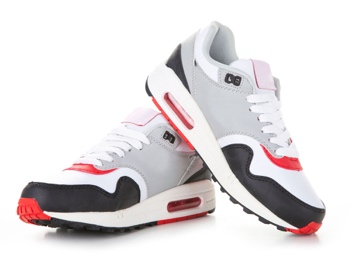
"UPPER_BODY"– Creates a mask that includes full arm length."LOWER_BODY"– Creates a mask the includes full leg length with no gap between the legs."FOOTWEAR"– Creates a mask that fits the shoe profile demonstrated in the source image."FULL_BODY"– Creates a mask equivalent to the combination of"UPPER_BODY"and"LOWER_BODY".
The following table shows example inputs with maskType: "GARMENT".
| Source | Reference | Garment class | Output |
 |
 |
 |
The following table shows example inputs with maskType: "PROMPT".
| Source image | Mask prompt | Reference image | Output |
 |
 |
 |
 |
There are also more fine-grained subclasses that can be useful in certain edge cases. By using the “PROMPT” mask type, you can use natural language to describe the item in the source image that you want to replace. This is useful for images of items other than garments. This feature uses the same auto-masking functionality that exists in the Nova Canvas “INPAINTING” task using the maskPrompt parameter.
By using the mask and understanding which garment areas needs to be replaced, the product image is inserted on the user’s photo as input. The model then generates the try-on image, which is stored in Amazon S3 with the job ID as metadata. Throughout this process, the system sends progress updates through the WebSocket connection. An Amazon S3 event notification triggers a Lambda function through Amazon SQS. The function generates a presigned URL for the result image and delivers it to the client through the established WebSocket connection. This completes the process, typically taking 7–11 seconds.
Implementation details
This section details the tables and schema used in our virtual try-on solution to help you further understand how the role each DynamoDB tables plays.
This solution uses four DynamoDB tables. The products_table stores the catalog of available items for virtual try-on. The virtual_try_on_jobs table maintains the state and tracking information for each try-on request. The vto-models table stores the catalog of customers images used for virtual try-on. The WebSocket connections table (vto-connections) tracks active WebSocket connections for real-time job status updates. The solution assumes the products table is prepopulated with the retailer’s inventory.
The products table (vto-products) stores the catalog of available items for virtual try-on. Products are automatically populated when images are uploaded to the /products/ S3 folder. The schema for the products table is as follows:
- product_id (string, partition key) – Unique identifier for the product
- product_picture_s3_url (string) – Amazon S3 URL of the original product image
- name (string) – Product display name
- category (string) – Product category for organization
- description (string) – Product details including style, color, and size options
- auto_imported (Boolean) – Flag indicating if product was imported automatically through Amazon S3 upload
- created_at (string) – ISO timestamp when product was added
- updated_at (string) – ISO timestamp of last modification
The models table (vto-models) stores the catalog of customer images used for virtual try-on. Models are automatically populated when images are uploaded to the /models/ S3 folder. The schema for the models table is as follows:
- model_id (string, partition key) – Unique identifier for the model
- model_picture_s3_url (string) – Amazon S3 URL of the model image
- name (string) – Model display name
- category (string) – Model category for organization
- description (string) – Model details and characteristics
- auto_imported (Boolean) – Flag indicating if model was imported automatically using Amazon S3 upload
- created_at (string) – ISO timestamp when model was added
- updated_at (string) – ISO timestamp of last modification
The virtual try-on jobs table (vto-jobs) maintains state and tracking information for each try-on request throughout the processing workflow. The schema for the virtual try-on jobs table is as follows:
- id (string, partition key) – Unique identifier for each try-on job
- model_id (string) – Reference to the model used
- product_id (string) – Reference to the product being tried on
- model_picture_s3_url (string) – Amazon S3 URL of the customer’s uploaded photo
- product_picture_s3_url (string) – Amazon S3 URL of the product being tried on
- result_s3_url (string) – Amazon S3 URL of the generated virtual try-on result image
- status (string) – Current job status (created, processing, completed, or error)
- parameters (map) – Virtual try-on API parameters (such as
maskType,mergeStyle, orgarmentClass) - connection_id (string) – WebSocket connection ID for real-time updates
- error_message (string) – Error details if job fails
- created_at (string) – ISO timestamp when job was created
- updated_at (string) – ISO timestamp of last status update
The WebSocket connections table (vto-connections) tracks active WebSocket connections for real-time job status updates. Further information on how using WebSocket API can be found at the Create a WebSocket chat app with a WebSocket API, Lambda, and DynamoDB tutorial. The schema is as follows:
- connection_id (string, partition key) – WebSocket connection identifier
- connected_at (string) – ISO timestamp when connection was established
- ttl (number) – Time-to-live for automatic cleanup of stale connections
Conclusion
In this post, we covered how to implement virtual try-on at scale, covering the main building blocks. For a quick start, we provide a complete GitHub sample with prerequisites, deployment scripts, example code and a comprehensive solution guidance document with best practices and configuration details. Use this guide to get started right away in experimenting with the solution.
As ecommerce continues to grow, reducing return rates while maintaining customer satisfaction becomes increasingly critical for retailers’ profitability and sustainability. This Virtual try-on solution demonstrates how AWS serverless services can be combined with generative AI to address a significant challenge. By using Amazon Nova Canvas alongside a robust serverless architecture, retailers can provide customers with accurate product visualization and pose conservation while maintaining the seamless shopping experience their most loyal customers expect. Implementation considerations extend beyond the technical architecture. Successful deployment requires careful attention to service quotas, monitoring, and cost optimization. Our solution guidance provides further detailed recommendations for managing WebSocket connections, implementing retry strategies, and optimizing resource utilization. These operational aspects are crucial for maintaining reliable performance during peak shopping periods while managing costs effectively.