
Large conferences and events generate overwhelming amounts of information—from hundreds of sessions and workshops to speaker profiles, venue maps, and constantly updating schedules. While basic AI assistants can answer simple questions about event logistics, most fail to deliver the personalized guidance and contextual awareness that attendees need to navigate complex, multi-day conferences effectively. More importantly, moving these prototypes from demo to production—with enterprise security, scalability for thousands of concurrent users, and reliable performance—typically requires months of infrastructure development.
This post demonstrates how to quickly deploy a production-ready event assistant using the components of Amazon Bedrock AgentCore. We’ll build an intelligent companion that remembers attendee preferences and builds personalized experiences over time, while Amazon Bedrock AgentCore handles the heavy lifting of production deployment: Amazon Bedrock AgentCore Memory for maintaining both conversation context and long-term preferences without custom storage solutions, Amazon Bedrock AgentCore Identity for secure multi-IDP authentication, and Amazon Bedrock AgentCore Runtime for serverless scaling and session isolation. We will also use Amazon Bedrock Knowledge Bases for managed RAG and event data retrieval.
By the end, you’ll learn how to deploy an assistant that grows more helpful with every interaction – a proactive guide that makes sure attendees can discover their most valuable sessions – ready to serve thousands of concurrent conference attendees with enterprise-grade security and reliability, all without managing infrastructure.
If you are new to Amazon Bedrock AgentCore, feel free to review the following blog posts to understand the foundational concepts before diving into this implementation:
Solution architecture
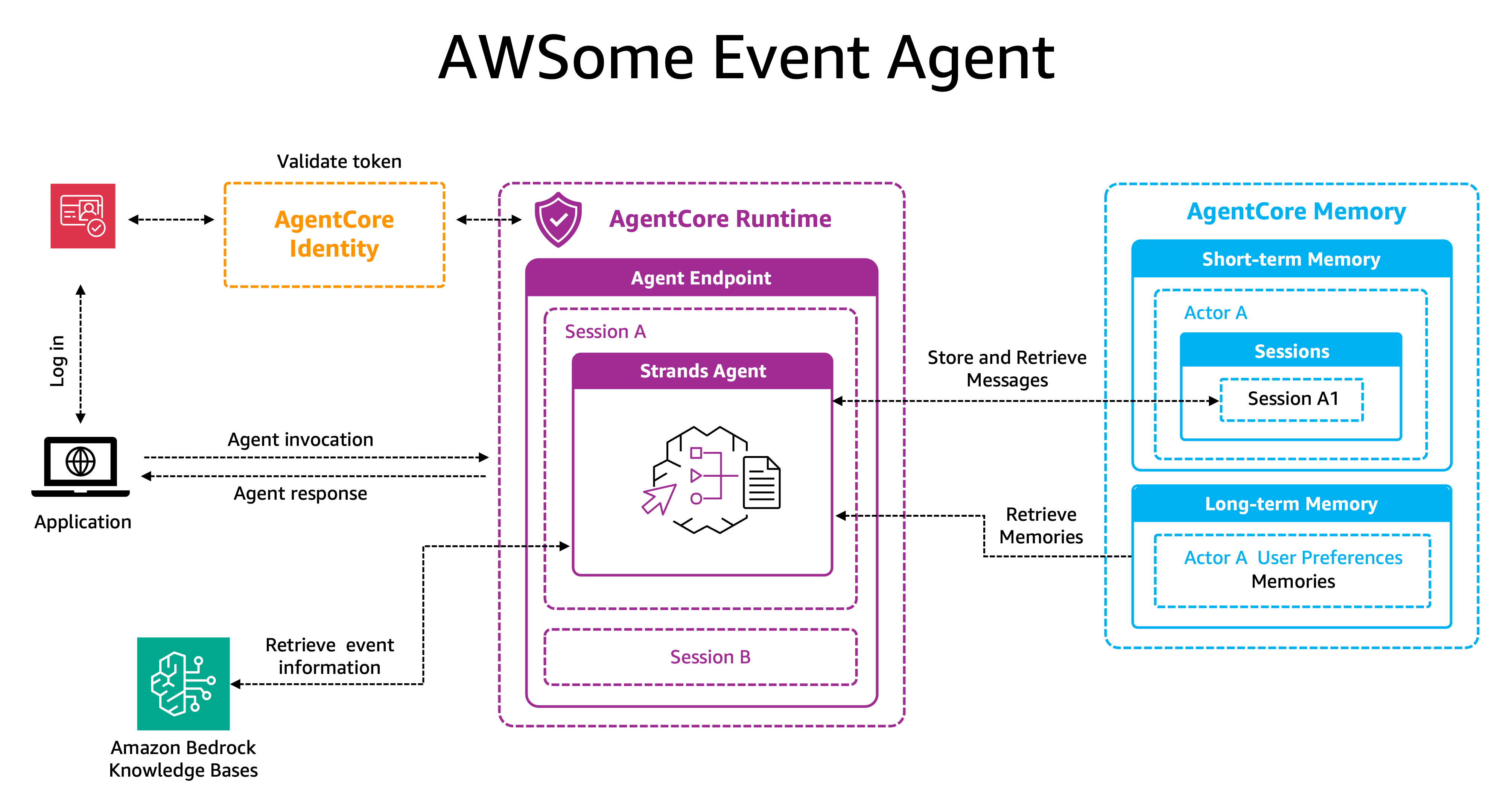
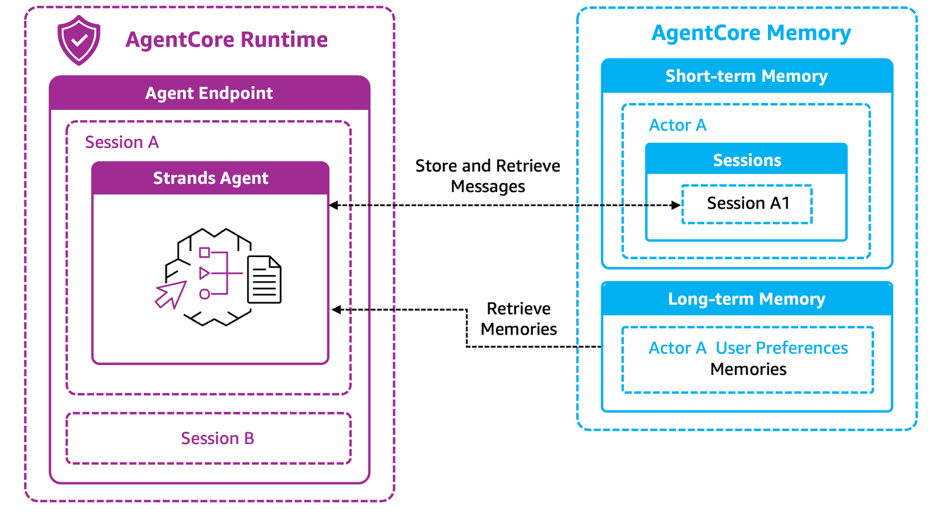
Let’s walk through the architecture and workflow of our intelligent event agent. The complete implementation is available in this GitHub repository which provides a guided notebook you can follow to deploy this solution in your own AWS account.
How the solution works
Let’s explore the different sections:
1. User login and identity retrieval
The user logs in to the application using Amazon Cognito (AgentCore Identity also supports other identity providers such as Okta, Auth0, and OIDC-compliant IDPs), which generates a bearer token upon successful authentication. This token contains information about the user and will be used throughout the workflow for authentication and retrieving user-specific data.
2. Agent invocation and initialization
When the user interacts with the application and submits a query, the application calls Amazon Bedrock AgentCore Runtime with three key parameters: the user’s query, a session ID (for example, SessionA), and the bearer token from Amazon Cognito. This links the interactions to both the user and their current session. AgentCore Identity authenticates and authorizes the user before allowing access to the agent.
On the first interaction, the Strands Agent initializes within Amazon Bedrock AgentCore Runtime and retrieves any available user preferences from the long-term storage of Amazon Bedrock AgentCore Memory, priming itself with personalized context. For subsequent interactions within the same session, the agent continues with the conversation using the context it has already established.
3. Message processing
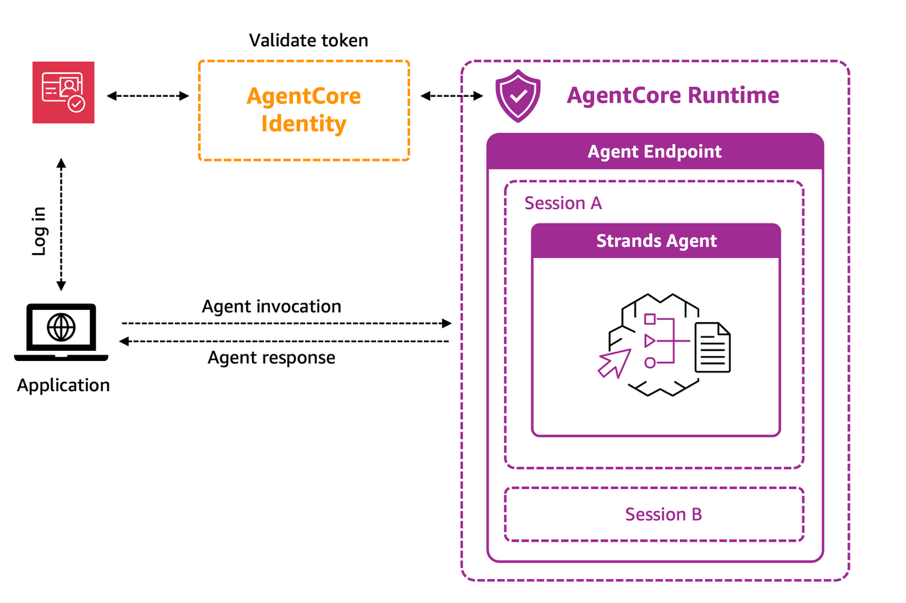
The agent stores both user and assistant messages in the short-term storage of Amazon Bedrock AgentCore Memory, containing both actor_id and session_id. The actor_id is the sub (subject identifier) claim extracted from the Amazon Cognito bearer token. The conversation context remains private and available only to the specific user within their current session. Behind the scenes, Amazon Bedrock AgentCore Memory employs a transformation pipeline that automatically processes these conversation events through configured memory strategies.
Each memory strategy uses pattern recognition and natural language understanding to analyze the raw conversation data, identifying specific types of valuable information—such as user preferences—and extracting meaningful insights that warrant long-term retention. The system then structures this extracted information into standardized memory records, tags them with relevant metadata, and stores them in dedicated namespaces within long-term memory, for the agent to use to build an increasingly refined understanding of users across multiple sessions.
4. Knowledge and memory retrieval
To fulfill the user’s request, the agent may trigger specialized tools. It can call an Amazon Bedrock knowledge base to fetch up-to-date event details such as session descriptions, schedules or speaker biographies.
5. Response generation
The agent processes the query enriched with three layers of context: insights from long-term memory (personalized attendee history), context from short-term memory (recent messages in the session), and current event data from the knowledge base. It then generates a contextualized and personalized response.This architecture transforms a simple query like “What sessions should I attend tomorrow?” into a personalized experience—the agent recalls topics the user liked yesterday, considers the current conversation and responds with specific recommendations tailored to the user’s interests and history.
Solution components
Let’s now understand the role of each component of the solution.
The agent (AgentCore Runtime and identity integration)
At the core of our event assistant solution is the Amazon Bedrock AgentCore Runtime, a component which provides a secure, serverless environment for hosting our agent. Runtime manages the complete lifecycle of user interactions through isolated sessions—each running in dedicated microVMs with separate CPU, memory, and filesystem resources. This session isolation makes sure that thousands of conference attendees can simultaneously interact with personalized instances of the agent without cross-session data contamination.
Security and authentication are handled through Amazon Bedrock AgentCore Identity, which integrates seamlessly with Amazon Cognito (and other IDPs). When an attendee sends a query to the event assistant, Amazon Bedrock AgentCore Identity validates the bearer token from Amazon Cognito before allowing the interaction to proceed. The bearer token is propagated through headers, and the agent retrieves this token to call the Amazon Cognito discovery server, extracting the user’s sub and other related user information. For this use case, we use the user sub as the actor_id for session information, enabling the agent to maintain user-specific context and deliver personalized recommendations. This identity-awareness helps make sure that each attendee’s preferences, conversation history, and session data can remain private and secure.
By combining the scalable hosting infrastructure of Runtime with the authentication framework of Identity, our event assistant can serve massive conferences more securely while delivering consistently personalized guidance to each individual attendee.
Agent memory
Amazon Bedrock AgentCore Memory provides the critical context awareness that transforms our event assistant from a simple Q&A tool into a truly personalized guide. The service is composed of short-term and long-term memory, which work together to enable continuous, evolving relationships between attendees and the event assistant.
Short-term memory: Capturing the conversation
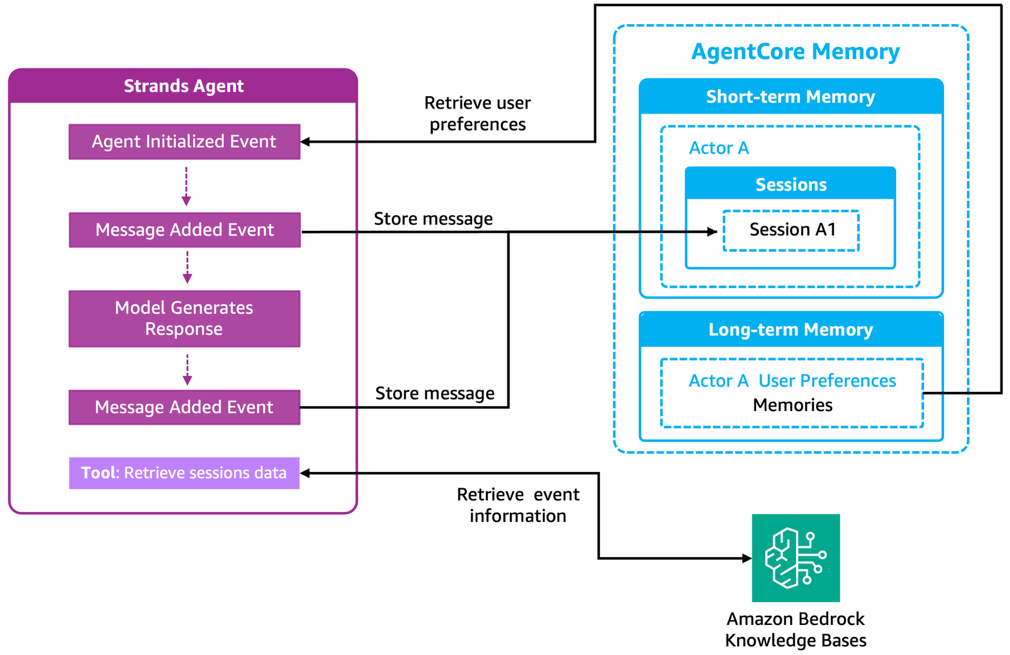
Short-term memory is where interactions begin. As conversations unfold, the agent synchronously stores each message exchange as an immutable event in short-term memory. These events are organized hierarchically by actor_id and session_id as shown in the diagram. Remember that the actor_id is extracted from the Cognito bearer token (the user’s sub), while the session_id comes from the AgentCore Runtime session identifier.
This organizational structure serves two critical purposes. First, it maintains the chronological narrative of each conversation, preserving the natural flow of the dialogue. Second, it provides precise isolation—Actor A’s conversation in Session A1 remains separate from Session B or from another actor’s sessions. This facilitates privacy and enables the agent to retrieve exactly the right conversation context without loading unrelated data. The agent can quickly retrieve recent messages from short-term memory to maintain conversation continuity. When an attendee asks a follow-up question like “What time is that session?” the agent knows which session was just discussed because it has immediate access to the conversation history.
Long-term memory: Building persistent intelligence
While short-term memory captures what was said, long-term memory extracts what matters. As conversations occur, the AgentCore Memory service automatically processes these interactions to identify and store meaningful insights that persist across sessions. Our event agent uses a User Preferences strategy to capture explicit preferences about session formats, topics, or presentation styles. For example, “Prefers hands-on workshops over lectures” or “Interested in serverless and machine learning topics.”
These preferences are stored in a dedicated namespace within long-term memory (for example, /event-agent/actor-A/preferences), for clear organization and targeted retrieval.
Agent and memory orchestration
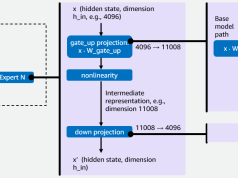
The seamless integration between the Strands Agent and AgentCore Memory is supported through agent hooks—event-driven touchpoints that automatically trigger memory operations throughout the agent’s lifecycle. As shown in the following diagram:
- The Agent Initialized Event hook retrieves user preferences from long-term memory when a session begins, loading the attendee’s interests and preferred session types to enable personalized recommendations from the first query.
- The Message Added Event hooks capture each user and assistant message, synchronously storing them in short-term memory to maintain conversation history.
Note: While AgentCore provides an automated memory manager that implements memory tools automatically, this solution uses hooks for precise control over when and how memory operations are invoked—for fine-tuned optimization for the event assistant’s specific workflow.
Beyond these automatic operations, if there isn’t enough information, the agent then uses the Retrieve sessions data tool to query the Amazon Bedrock knowledge base for current event details.
This dual approach—preloading essential context at startup and selectively retrieving details on-demand—delivers both speed and precision without bloating the session context with unnecessary information.
Amazon Bedrock Knowledge Bases
While AgentCore Memory maintains personalized context and conversation history, large conferences generate vast amounts of structured information—hundreds of session details, speaker profiles, venue maps, and schedule updates—that require efficient organization and retrieval.
Amazon Bedrock Knowledge Bases is a fully managed service that supports Retrieval-Augmented Generation (RAG) by connecting foundation models to your data sources. It automatically handles the ingestion, processing, and indexing of documents, converting them into vector embeddings stored in a vector database. This allows agents to perform semantic searches—retrieving information based on meaning and context rather than exact keyword matches.
The architecture implements the knowledge base as a specialized tool within the Strands framework. When attendees ask specific questions about sessions, speakers, or venue logistics, the agent invokes this tool to retrieve precise, up-to-date information. The integration between memory and knowledge base creates a powerful combination. When an attendee asks, “Which AI sessions should I attend?”, the agent retrieves session details from the knowledge base while using memory to filter and prioritize recommendations based on the attendee’s previously expressed interests. This facilitates responses that are both factually complete and personally relevant, helping transform the overwhelming complexity of large conferences into manageable, tailored guidance.
Conclusion
In this post, we’ve explored how you can use Amazon Bedrock AgentCore components to rapidly productionize an event assistant—taking it from prototype to enterprise-ready deployment at scale. While building intelligent conversational agents is achievable with various tools, the real challenge lies in production deployment. The value of Amazon Bedrock Knowledge Bases and Amazon Bedrock AgentCore is in providing managed services that handle authentication, scaling, memory management, and RAG capabilities out of the box—helping remove months of infrastructure work.
The result is an event assistant that remembers an attendee’s interest in serverless technologies from yesterday’s conversations, understands they prefer hands-on workshops, and uses this context to deliver relevant recommendations from tomorrow’s schedule—all while maintaining the conversation flow of an ongoing planning session.
This is the difference between a prototype that demonstrates intelligent behavior and a production-ready system that can deliver personalized experiences to thousands of concurrent conference attendees with enterprise security and reliability. Whether you’re planning a small corporate gathering or a massive multi-day conference, Amazon Bedrock AgentCore provides the managed infrastructure to deploy intelligent assistance in days rather than months.
Next Steps
Ready to enhance your event assistant further? Here are some ways to extend this solution:
- Expand capabilities with AgentCore Gateway: Amazon Bedrock AgentCore Gateway helps to connect your event assistant to additional tools and services at scale. Convert existing APIs, Lambda functions, or third-party services into tools your agent can use—whether that’s integrating with event registration systems, connecting to Slack for attendee notifications, or linking to Salesforce for lead tracking.
- Explore the GitHub Repository: Visit our complete implementation with step-by-step guidance, example code, and deployment instructions to build this solution in your own AWS account.