Extracting structured information from unstructured data is a critical first step to unlocking business value. Our Generative AI Intelligent Document Processing (GenAI IDP) Accelerator has been at the forefront of this transformation, already having processed tens of millions of documents for hundreds of customers.
Although organizations can use intelligent document processing (IDP) solutions to digitize their documents by extracting structured data, the methods to efficiently analyze this processed data remains elusive. After documents are processed and structured, a new challenge emerges: how can businesses quickly analyze this wealth of information and unlock actionable insights?
To address this need, we are announcing Analytics Agent, a new feature that is seamlessly integrated into the GenAI IDP Accelerator. With this feature, users can perform advanced searches and complex analyses using natural language queries without SQL or data analysis expertise.
In this post, we discuss how non-technical users can use this tool to analyze and understand the documents they have processed at scale with natural language.
GenAI IDP Accelerator
The GenAI IDP Accelerator, an open source solution, helps organizations use generative AI to automatically extract information from various document types. The accelerator combines Amazon Bedrock and other AWS services, including AWS Lambda, AWS Step Functions, Amazon Simple Queue Service (Amazon SQS), and Amazon DynamoDB, to create a serverless system. The GenAI IDP Accelerator is designed to work at scale and can handle thousands of documents daily. It offers three processing patterns for users to build custom solutions for complex document processing workflows. The accelerator can be deployed using AWS CloudFormation templates, and users can start processing documents immediately through either the web interface or by uploading files directly to Amazon Simple Storage Service (Amazon S3). The accelerator consists of multiple modules like document classification, data extraction, assessment, summarization, and evaluation. To learn more about the GenAI IDP Accelerator, see Accelerate intelligent document processing with generative AI on AWS.
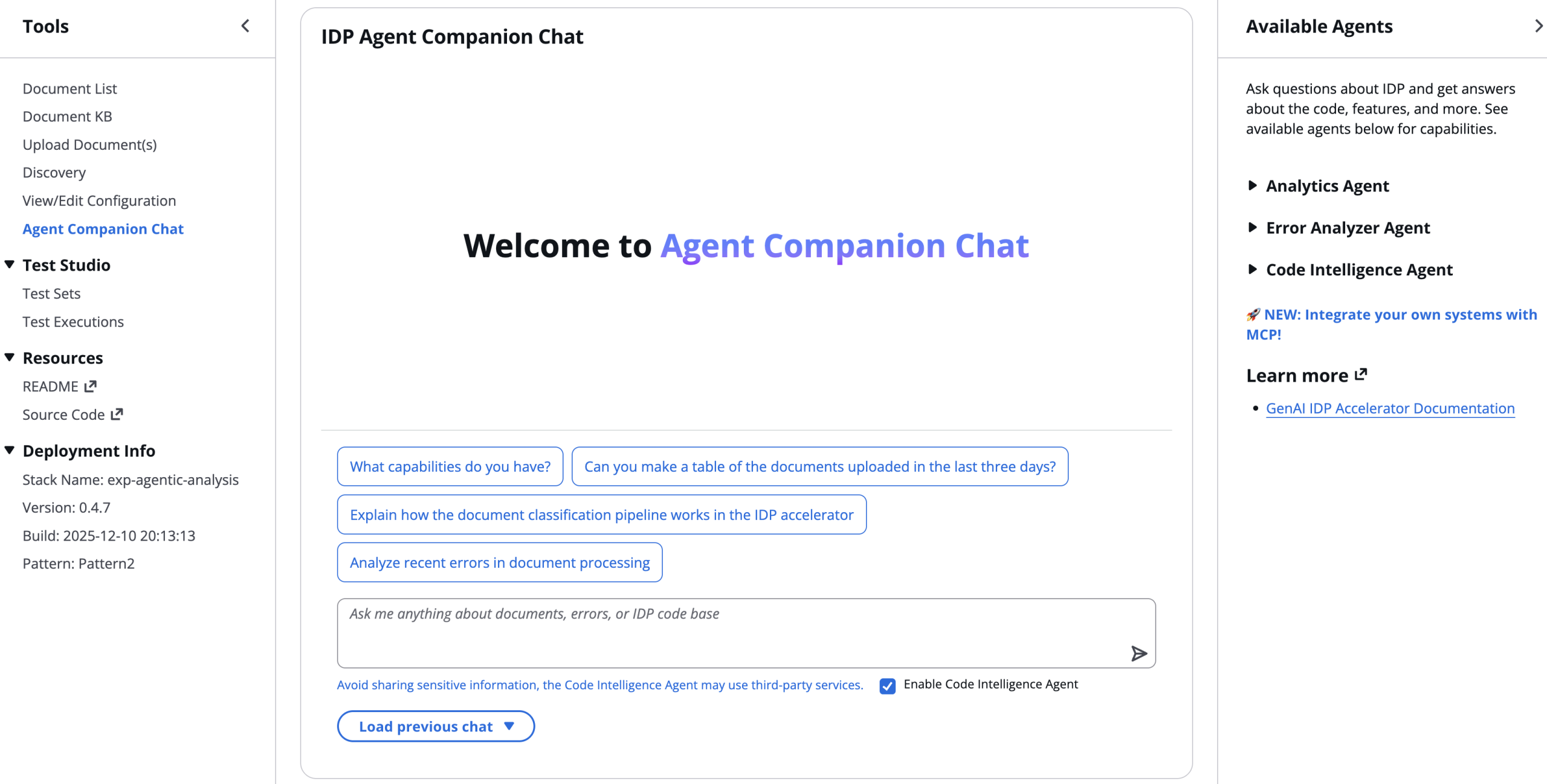
Now, using natural language queries through the Analytics Agent feature, you can extract valuable information to understand the performance of the solution. To access this feature, simply deploy the latest version of the GenAI IDP Accelerator and choose Agent Companion Chat in the navigation pane, as shown in the following screenshot (from accelerator version 0.4.7). Queries related to analytics automatically get routed to the Analytics Agent.
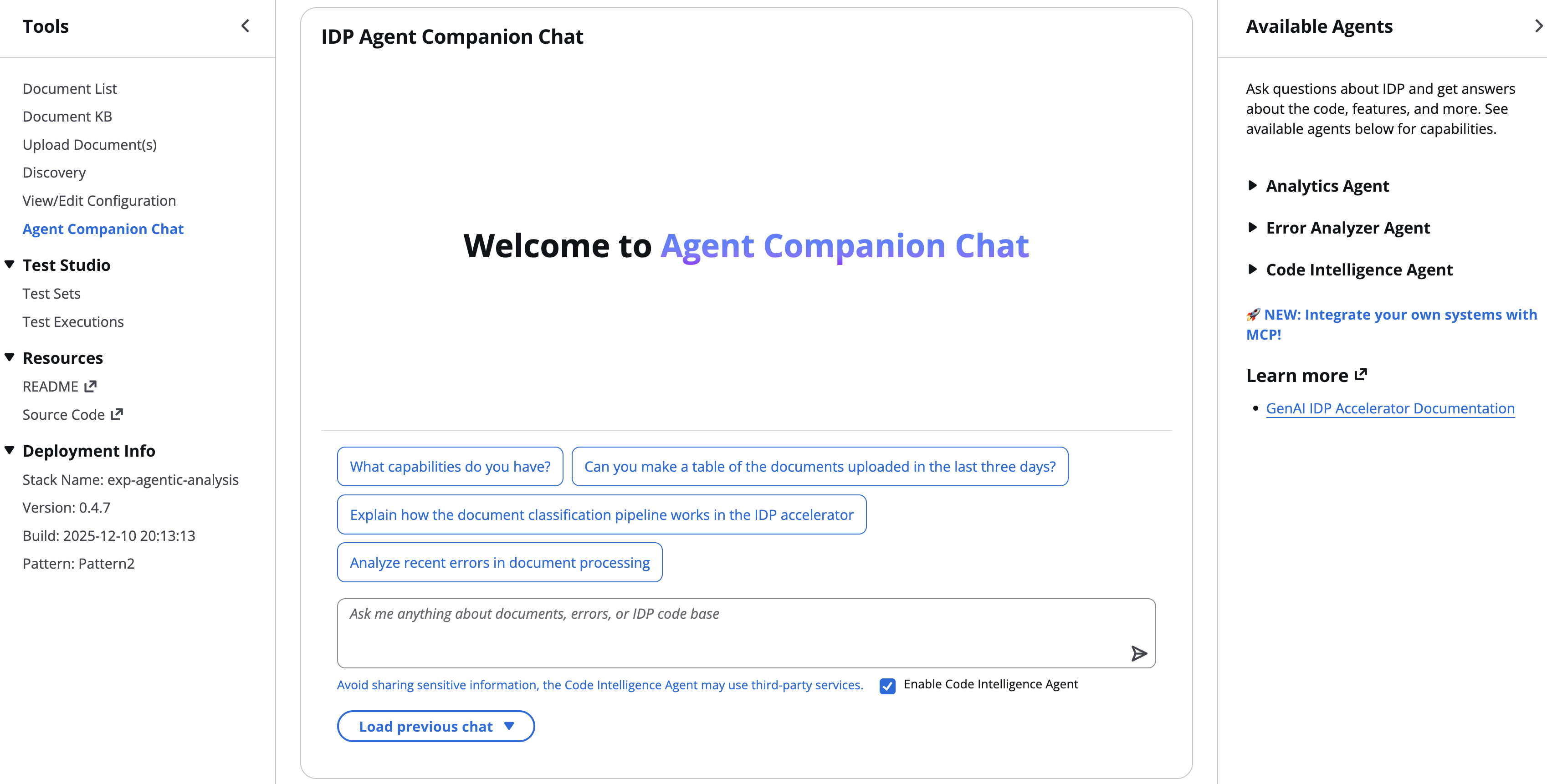
The Analytics Agent acts as an intelligent interface between business users and their processed document data. It can handle intricate queries that would typically require a skilled data scientist, making advanced analytics accessible to the average business user. For example, a healthcare provider could ask, “What percentage of insurance claims were denied last month? Of those, how many were due to incomplete documentation? Show me a trend of denial reasons over the past six months.” Or a tax accounting firm could ask, “Which of my clients are paying state tax in more than one state on their W2 forms?”
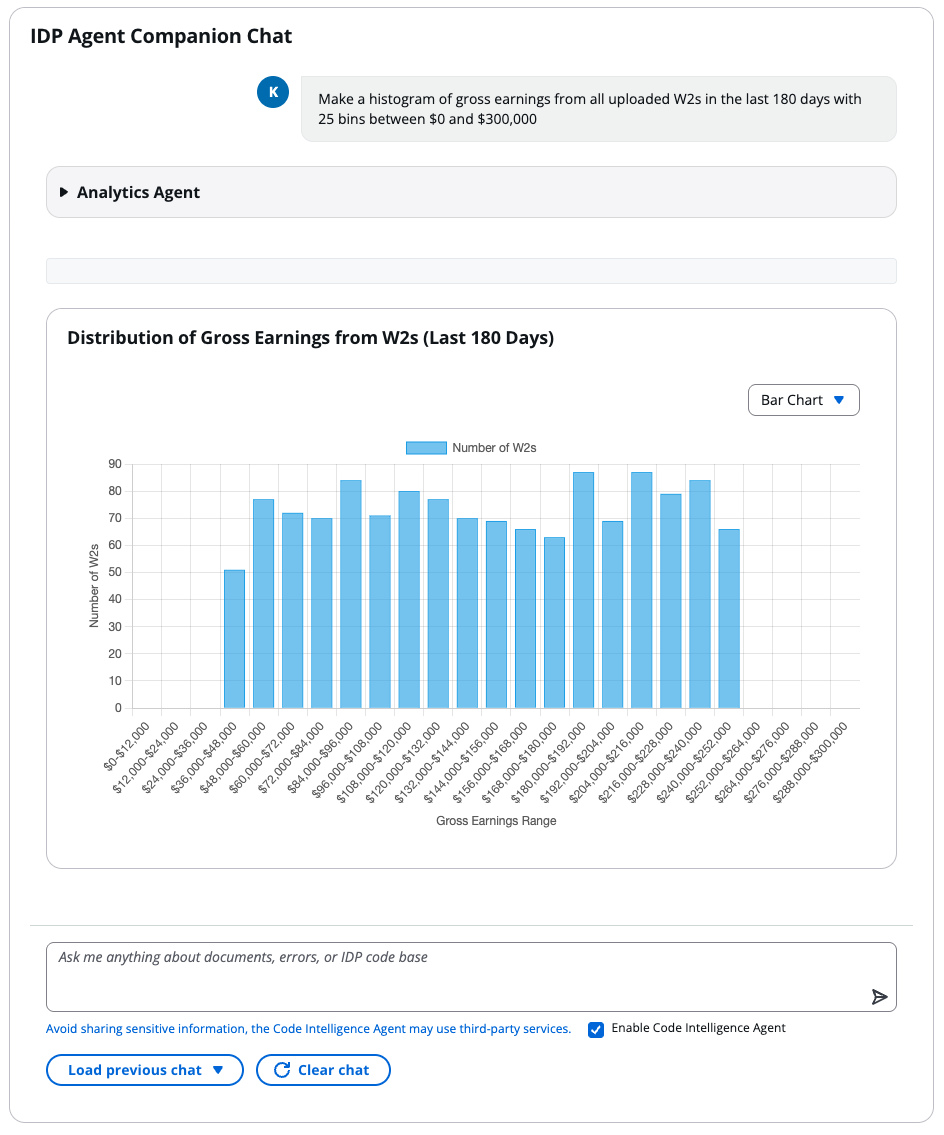
The following screenshot is an example of an analysis using the Analytics Agent feature through the Agent Companion Chat interface. A user in the accounting vertical queried “Make a histogram of gross earnings from all uploaded W2s in the last 180 days with 25 bins between $0 and $300,000,” and the agent analyzed data extracted from over 1,000 W2 forms in under a minute.
Analytics Agent
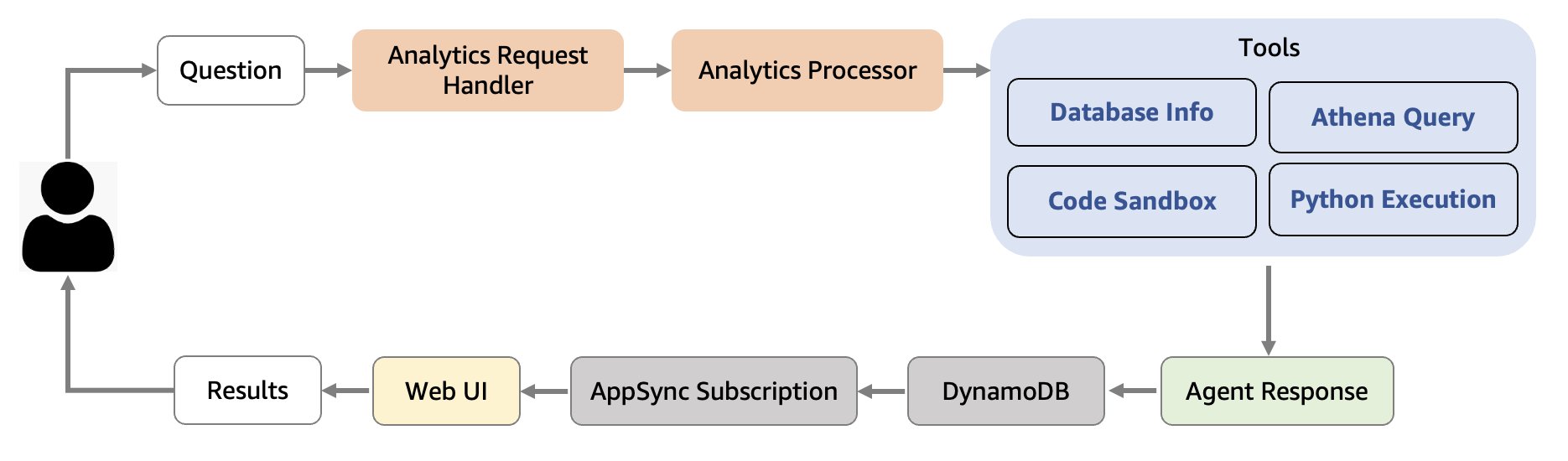
The Analytics Agent is built using Strands Agents, an open source SDK with a model-driven approach for building AI agents. The agent, using several tools, is designed to make working with enterprise data more intuitive by providing natural language to data and visualization conversion. The Analytics Agent workflow consists of the following steps:
- The agent uses a database exploration tool if needed to understand data structures stored in Amazon Athena tables within the IDP solution. This is required because the tables within the IDP solution can have different schemas based on how users have configured the processing pipeline.
- The agent converts natural language queries into optimized SQL queries compatible with the available databases and tables. These queries can scale to tables of arbitrary size.
- The agent runs SQL against Athena and stores query results in Amazon S3. These results can be thousands of rows long. It automatically fixes and reruns potential failed queries based on the error message generated by Athena.
- The agent securely transfers query results from Amazon S3 into an AWS Bedrock AgentCore Code Interpreter sandbox.
- The agent writes Python code designed to analyze the query results and generate charts or tables in a structured output compatible with the UI. The code is copied into the sandbox and is executed securely there.
- Lastly, final visualizations are presented in the web interface for straightforward interpretation.
The following diagram illustrates the workflow of the Analytics Agent.
Solution overview
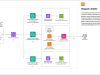
The following architecture diagram illustrates the serverless Analytics Agent deployment and its integration with the existing IDP solution through the AWS AppSync API.
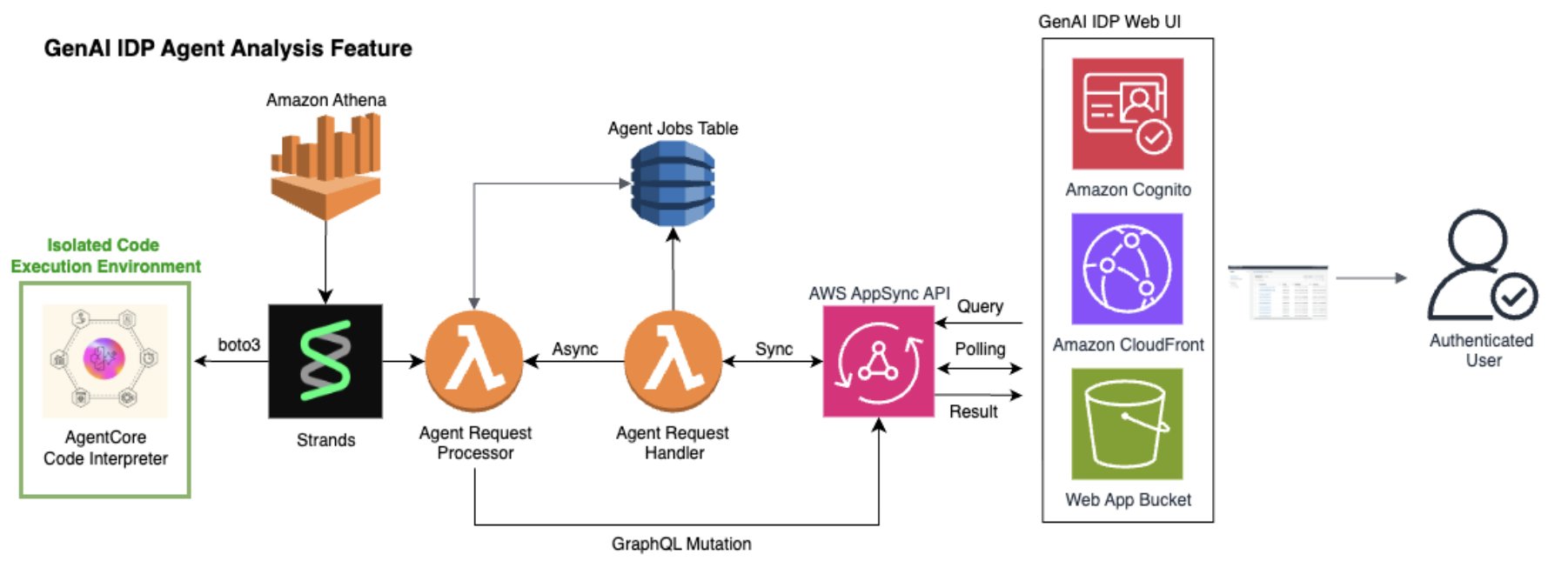
The Analytics Agent is deployed primarily within Lambda functions. When a user query is provided to the AppSync API from the IDP frontend, an ephemeral request handler Lambda function creates and stores a unique job ID in DynamoDB to track the asynchronous processing flow, and launches a long-running agent request processor Lambda function that instantiates a Strands agent and launches it. The frontend polls the job status and retrieves final results (including from prior jobs) from DynamoDB. The agent request processor Lambda function has AWS Identity and Access Management (IAM) permissions to access the IDP tables in Athena as well as to launch and execute an AgentCore Code Interpreter sandbox for more secure Python code execution.
The architecture follows a security-first design:
- Sandboxed execution – The Python code runs in AgentCore Code Interpreter, completely isolated from the rest of the AWS environment and the internet
- Secure data transfer – Query results are transferred through Amazon S3 and AgentCore APIs, not through the context window of an LLM
- Session management – AgentCore Code Interpreter sessions are properly managed and cleaned up after use
- Minimal permissions – Each component requests only the necessary AWS permissions
- Audit trail – The solution offers comprehensive logging and monitoring for security reviews
Intelligent document insights with the Analytics Agent
To demonstrate the capabilities of the Analytics Agent, we processed 10,000 documents from the RVL-CDIP dataset using the GenAI IDP Accelerator. The dataset, containing diverse document types including memos, letters, forms, and reports, was processed using Pattern 2 configuration to extract structured information including document type, sender, recipient, and department details. In the following sections, we walk through the details of a single sample user query.
Real-world query: Departmental memo analysis
A business user posed a straightforward question in natural language: “Which departments generate the most memos?” This seemingly simple query would traditionally require a data analyst to complete the following steps:
- Obtain credentials and connect to an internal database
- Understand the database schema by executing exploratory queries or reading internal documentation
- Write complex SQL with proper Athena syntax
- Execute and validate the query
- Process results and create visualizations
- Format findings for presentation
The Analytics Agent handled this entire workflow autonomously in under 60 seconds.
Generated visualization using the Analytics Agent
The following figure shows the visualization the agent generated based on a single natural language query.
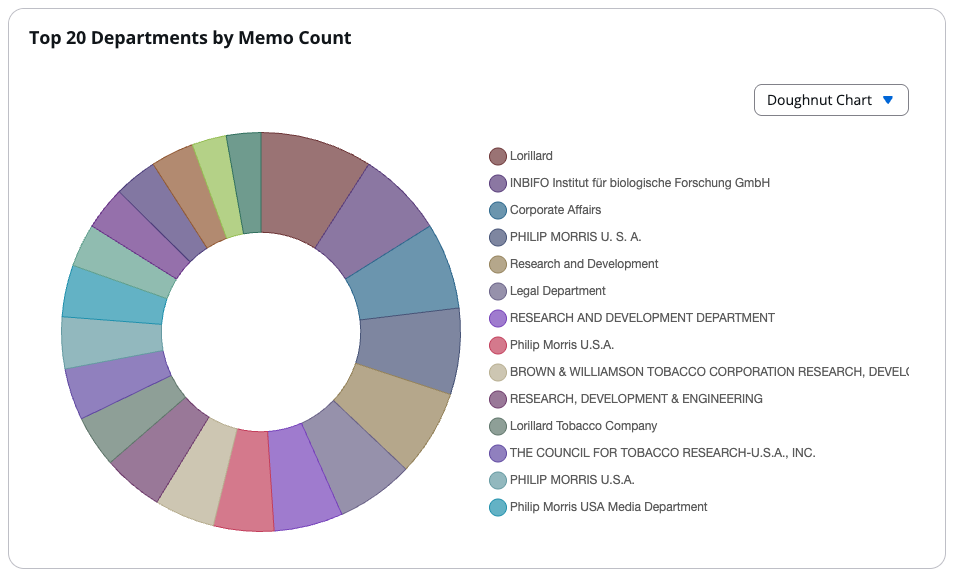
The analysis revealed that Lorillard generated the most memos (11 documents), followed by INBIFO, Corporate Affairs, and Philip Morris departments (10 documents each). The visualization showed the distribution across major organizational units, with tobacco research and corporate departments dominating memo generation. If the user wants a different visualization style, they can quickly toggle through various options like pie charts, line charts, and bar charts. They can also display the results as a table. We toggled the original bar chart it created to a doughnut chart for aesthetic purposes in this blog post.
Agent thought process
The agent’s transparent reasoning process reveals the comprehensive orchestration happening behind the scenes.
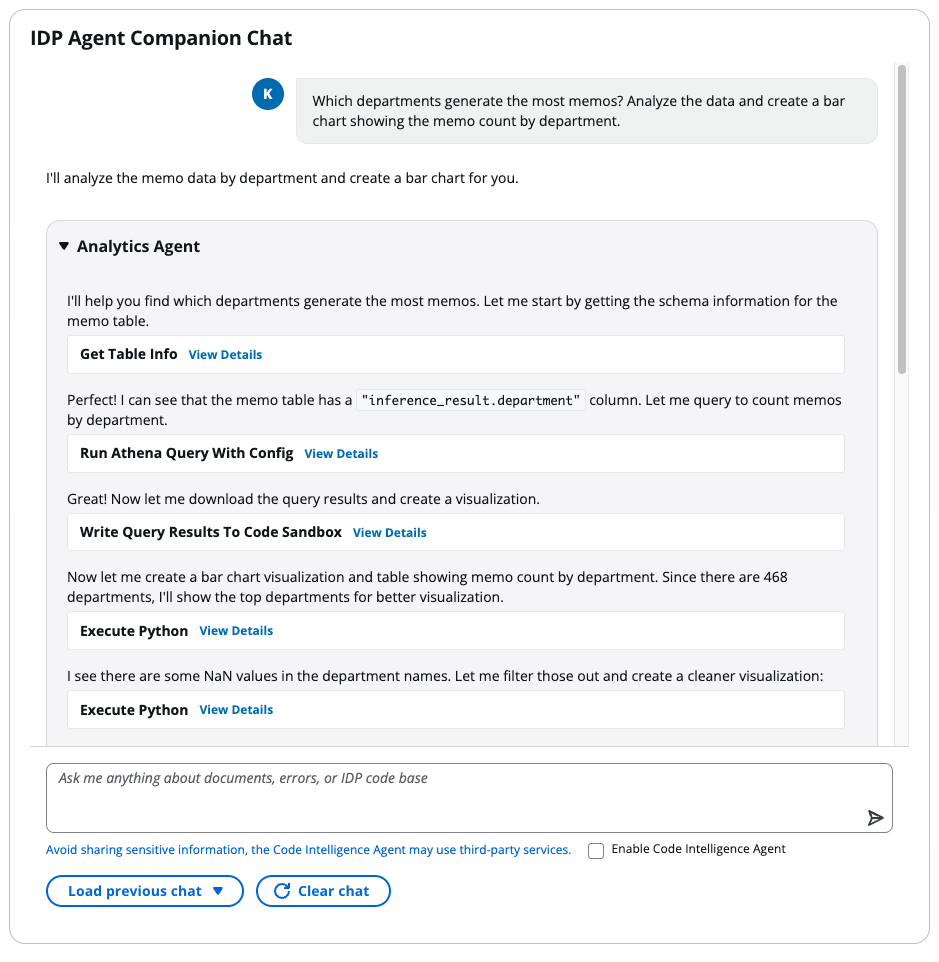
The agent first explored the database structure, identifying the document_sections_memo table and discovering the inference_result.department column containing the needed information.
The agent crafted an optimized Athena query with proper column quoting and null handling, which can be displayed by clicking “View Details” in the chat window:
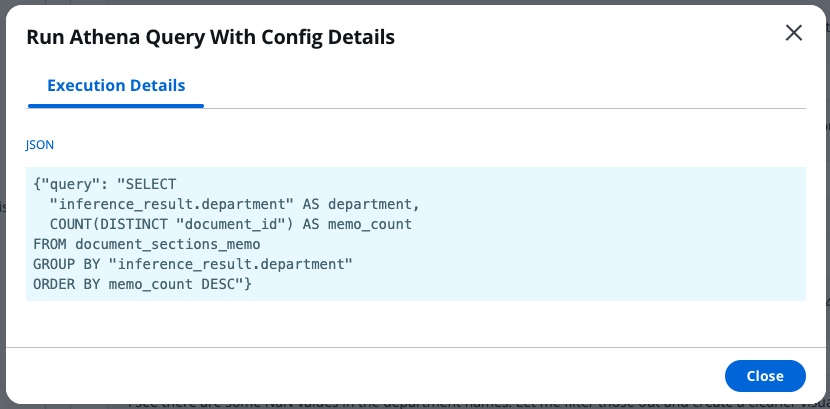
After retrieving unique departments from the query results, the agent automatically performed the following actions:
- Generated Python code to analyze and visualize the data
- Copied the Python code and SQL query results into a secure AgentCore Code Interpreter sandbox
- Executed the Python code within the sandbox, returning a JSON dictionary with chart data
- Identified and fixed an issue with a NaN value in the data
- Created a horizontal bar chart highlighting the top 15 departments
- Formatted the output for seamless web display
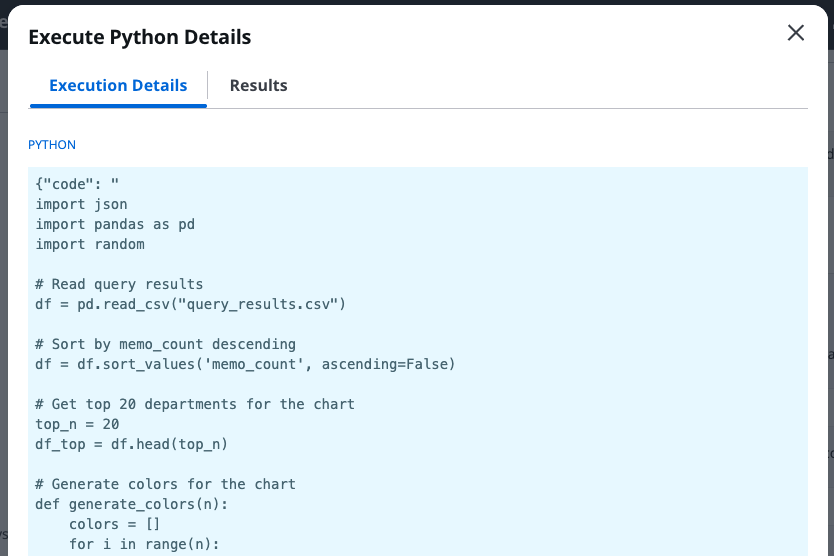
The python code it wrote to load the query results into sandbox memory and generate a plot to display in the frontend can be displayed by clicking “View Details” in the chat window (screenshot cropped for brevity):
Agent capabilities
This example showcases three transformative capabilities:
- Autonomous problem-solving – The agent independently discovered the database schema, identified the correct table and columns, and handled data quality issues (null values) without human intervention. This means that the agent can work on different documents analyzed by the IDP solution, regardless of document type or IDP processing configurations.
- Adaptive reasoning – When the agent detected null values in the initial visualization, it automatically corrected the issue by filtering the data and regenerating the chart, demonstrating self-correction capabilities.
- End-to-end interpretability – The entire workflow, from natural language query to polished visualization, executed in 90 seconds with complete transparency. Users can review each decision the agent made through the detailed thought process log.
The Analytics Agent transforms processed document data into actionable intelligence, helping business users explore their document corpus with the same ease as asking a colleague a question. This democratization of data analysis makes sure valuable insights aren’t locked away behind technical barriers, and are immediately accessible to decision-makers across the organization.
How customers can use this feature
The power of this feature lies in its ability to democratize data analysis, turning business users into data analysts through the simple power of conversation. Customers can use this feature in the following use cases:
- Instant business insights:
- Ask complex questions in plain English, like “What percentage of invoices exceeded $50,000 last quarter?”
- Get immediate visualizations of trends and patterns with queries like “How has the average value of invoices trended over the past 12 months?”
- Make data-driven decisions without waiting for IT or data science teams with queries like “Show me which employees based out of the Seattle office submitted the most invoices.”
- Risk and compliance monitoring:
- Detect anomalies in real time with queries like “Show me all contracts missing mandatory clauses.”
- Track compliance rates across document types.
- Identify high-risk documents requiring immediate attention.
- Operational excellence:
- Monitor processing bottlenecks with queries like “Which document types have the longest processing times?”
- Track accuracy rates across different document categories.
- Optimize resource allocation based on volume patterns.
- Customer experience enhancement:
- Analyze customer-specific processing metrics with queries like “How close are we to using up our monthly processing allocation budget of $100 this month?”
- Identify opportunities for process automation.
- Track SLA compliance in real time with queries like “Which processed invoices don’t have an associated processed pay slip associated with them yet?”
- Strategic planning:
- Forecast processing volumes based on historical patterns with queries like “We are expecting our number of uploaded documents to increase 20% year over year. How many documents will we expect to process in the next five years?”
- Identify seasonal trends and plan accordingly.
- Track ROI metrics for document processing investments.
- Make data-backed decisions for system scaling.
Best practices
Consider the following best practices when using the Analytics Agent:
- Start broad – Begin with general questions before diving into specifics.
- Be specific – Clearly state what information you’re looking for. Don’t be afraid to provide an entire paragraph describing what you need if necessary.
- Use follow-up queries – Build on what you learned in previous questions to explore topics in depth. Chat messages sent in the Agent Companion Chat are stateful, enabling you to ask followup questions.
- Check results – Verify visualizations make sense for your data, and read through the displayed agent thought process to validate the decisions it made.
Integration with external agentic AI systems
The Analytics Agent can be easily integrated into other agentic AI systems, such as Amazon Quick Suite, through the IDP Accelerator’s new Model Context Protocol (MCP) Server. Organizations can incorporate document analytics capabilities into their broader AI workflows and automation platforms using this integration. For implementation guidance and technical details, see the MCP integration documentation.
Clean up
When you’re finished experimenting with the Agent Analysis feature, you have two cleanup options depending on your needs:
- Remove individual analytics queries – Navigate to the Agent Analysis section in the web UI and use the “load previous chat” pane to delete specific queries. Alternatively, you can remove query entries directly from the DynamoDB analytics jobs table associated with your stack.
- Delete the entire IDP deployment – Use the CloudFormation console to delete the IDP stack. For automated cleanup with S3 bucket emptying, you can use the IDP CLI:
idp-cli delete --stack-name my-idp-stack --empty-buckets --force
For more detailed cleanup procedures and options, see the IDP CLI documentation.
Conclusion
In this post, we discussed the new Analytics Agent feature for the GenAI IDP Accelerator, an autonomous agent built on Strands that helps non-technical users analyze and understand the documents they have processed at scale with natural language. With this agent, users no longer need SQL expertise or knowledge of underlying database structures to retrieve data or generate visualizations.
Visit the GenAI IDP Accelerator GitHub repository for detailed guides and examples and choose Watch to stay informed on new releases and features. AWS Professional Services and AWS Partners are available to help with implementation. You can also join the GitHub community to contribute improvements and share your experiences.
About the authors
 David Kaleko is a Senior Applied Scientist at the AWS Generative AI Innovation Center, where he leads applied research efforts into cutting-edge generative AI implementation strategies for AWS customers. He holds a PhD in particle physics from Columbia University.
 Tryambak Gangopadhyay is a Senior Applied Scientist at the AWS Generative AI Innovation Center, where he collaborates with organizations across a diverse spectrum of industries. His role involves researching and developing generative AI solutions to address crucial business challenges and accelerate AI adoption. Prior to joining AWS, Tryambak completed his PhD at Iowa State University.
 Mofijul Islam is an Applied Scientist II and Tech Lead at the AWS Generative AI Innovation Center, where he helps customers tackle customer-centric research and business challenges using generative AI, large language models, multi-agent learning, code generation, and multimodal learning. He holds a PhD in machine learning from the University of Virginia, where his work focused on multimodal machine learning, multilingual NLP, and multitask learning. His research has been published in top-tier conferences like NeurIPS, ICLR, EMNLP, AISTATS, and AAAI, as well as IEEE and ACM Transactions.
 Jordan Ratner is a Senior Generative AI Strategist at Amazon Web Services, where he helps companies of different sizes design, deploy, and scale AI solutions. He previously co-founded Deloitte’s global AI practice and led OneReach.ai as Managing Partner, scaling conversational and generative AI deployments worldwide. Jordan now focuses on turning fast-moving AI trends into reusable products and frameworks, driving real adoption across industries.
 Bob Strahan is a Principal Solutions Architect in the AWS Generative AI Innovation Center.