


The release of Anthropic Claude Sonnet 4.5 in the AWS GovCloud (US) Region introduces a straightforward on-ramp for AI-assisted development for workloads with regulatory compliance requirements.
In this post, we explore how to combine Claude Sonnet 4.5 on Amazon Bedrock in AWS GovCloud (US) with Claude Code, an agentic coding assistant released by Anthropic. This solution enables AI-assisted workflows that help improve everyday development tasks while helping organizations maintain strict compliance alignment and meet regulatory requirements such as International Traffic in Arms Regulations (ITAR), Impact Level (IL) 4 or 5, and FedRAMP High compliance.
Amazon Bedrock in AWS GovCloud (US)
AWS GovCloud (US) Regions are designed specifically for US customers with workloads that require stringent compliance accreditations. This allows generative AI workloads to be deployed to sensitive environments while maintaining the appropriate compliance controls. Amazon Bedrock is built with security-focused features, including:
- Built-in data protection where customer content isn’t stored, logged, or used to train AWS models or shared with third parties.
- FedRAMP High and DoD Cloud Computing (CC) SRG Impact Level (IL) 4/5 authorization pathways, supporting government agencies’ compliance requirements.
- Integration with existing security controls and compliance frameworks available in AWS GovCloud (US), maintaining the same high security standards as other AWS Regions while providing additional authorization pathways.
Claude Code
Claude Code is Anthropic’s AI coding assistant powered by the latest foundation models, such as Anthropic Claude Sonnet 4.5, which is available on Amazon Bedrock in AWS GovCloud (US-West) and GovCloud (US-East) through US-GOV cross-Region Inference. It operates directly in your terminal, your favorite integrated development environment (IDEs) such as VS Code and JetBrains, and in the background with Claude Agent SDK. Claude Code can understand your project context and take inline actions without requiring you to manually add generated code snippets to a project. Unlike traditional coding assistants, Claude Code can:
- Write code and fix bugs spanning multiple files across your codebase
- Answer questions about your code’s architecture and logic
- Execute and fix tests, linting, and other commands
- Search through Git history, resolve merge conflicts, and create commits and pull requests
- Extend to other command line tools, like AWS Command Line Interface (AWS CLI), Terraform, K8s, and MCP servers
To learn more, see Anthropic’s articles: Claude Code tutorials and Claude Code: Best practices for agentic coding.
Solution overview: Try Claude Code with Amazon Bedrock in GovCloud
This section provides step-by-step instructions for setting up and configuring Claude Code to work with Amazon Bedrock in AWS GovCloud, including prerequisites, installation commands, environment configuration, and verification steps.
Prerequisites
Before you get started, make sure that you have the following in place:
- An AWS GovCloud account with access to Amazon Bedrock.
- Appropriate AWS Identity and Access Management (IAM) roles and permissions for Amazon Bedrock.
- Amazon Bedrock model access to Anthropic Claude Sonnet 4.5 and Claude Haiku 3 on the standard AWS account ID associated with your AWS GovCloud (US) account ID.
- AWS Command Line Interface (AWS CLI) configured with valid AWS session credentials using short-term API keys or AWS log in.
To maximize inference efficiency, prompt caching is automatically turned on for supported models and AWS Regions—including Claude Sonnet 4.5.
Set up Claude Code with Claude Sonnet 4.5 on Amazon Bedrock
After configuring AWS CLI with your credentials, in this example you install Claude Code for macOS, Linux, and WSL (additional install methods can be found in the Claude Code Docs):
- Install Claude Code:
- Configure for Amazon Bedrock:
- Navigate to your project:
- Launch Claude Code
- Verify that Claude Code is running by checking for the
Welcome to Claude Code!message in your terminal.
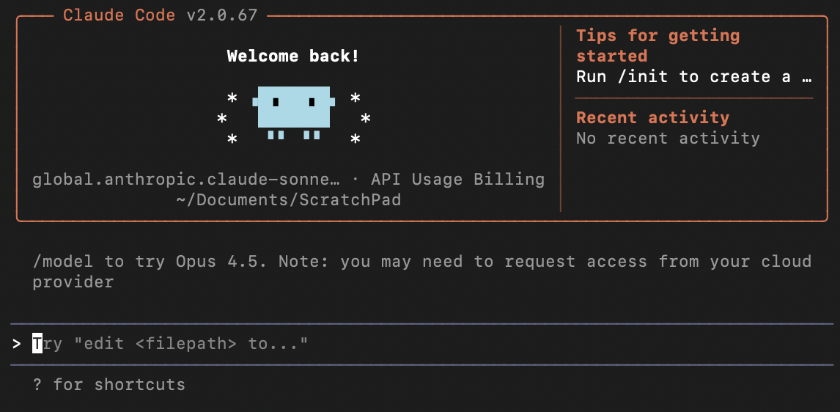
To validate your specified model, run the /status command. This will reflect the model ID defined in step 2. You have now successfully connected Claude Code to Amazon Bedrock in GovCloud.
To learn more about how to configure Claude Code for Amazon Bedrock, see Claude Code on Amazon Bedrock.
Considerations when deploying Claude Code to your organization
With Claude Code now generally available, many customers are considering deployment options on AWS to take advantage of its enhanced coding capabilities. For deployments, consider your foundational architecture for security, governance and compliance:
Use AWS IAM Identity Center to centrally govern identity and access to Claude Code. This verifies that only authorized developers have access. Additionally, using IAM Identity Center, developers can access resources with temporary, role-based credentials, alleviating the need for static access keys and helping enhance security. Prior to opening Claude Code, make sure that you configure AWS CLI to use an IAM Identity Center profile by using aws configure sso --profile <PROFILE_NAME>. Then, you log in using the profile created aws sso login --profile <PROFILE_NAME>.
Consider automated configuration of default environment variables. This includes the environment variables outlined in this post, such as AWS_REGION, CLAUDE_CODE_USE_BEDROCK, ANTHROPIC_MODEL, and ANTHROPIC_SMALL_FAST_MODEL. This will configure Claude Code to automatically connect Amazon Bedrock, providing a consistent baseline for development across teams. Organizations can start by providing developers with self-service instructions.
Consider implementing Guidance for Claude Code with Amazon Bedrock for large enterprise deployments. The guidance helps organizations deploy Claude Code while maintaining strict control over AI resource access, seamlessly connecting to existing identity infrastructure and providing observability for developer productivity and usage patterns.
Review service quotas and set an appropriate tokens per minute (TPM) and requests per minute (RPM) based on the number of active developers. Make sure that you have enough TPM and RPM quotas to support your team’s usage. It’s recommended to use a single AWS account for inference. For guidance, follow the rate limit recommendations. For example, if you have 200 developers, you might request 20,000 TPM for each developer, or 4 million total TPM.
Consider permissions, memory, and Model Context Protocol (MCP) servers for your organization. Security teams can configure managed permissions for what Claude Code is and is not allowed to do, which cannot be overwritten by local configuration. In addition, you can configure memory across the projects so you can auto-add common bash command files workflows, and style conventions to align with your organization’s preference. This can be done by deploying your CLAUDE.md file into an enterprise directory /<enterprise root>/CLAUDE.md or the user’s home directory ~/.claude/CLAUDE.md. Finally, we recommend that one central team configures MCP servers and checks a .mcp.json configuration into the codebase so that the users can benefit.
Consider conducting a thorough security assessment based on your organization’s needs when integrating Claude Code, a third-party product, with Amazon Bedrock. While Amazon Bedrock provides robust security features, Claude Code operates independently on local machines, requiring separate evaluation and risk management. Consider implementing appropriate controls and monitoring for Claude Code, similar to how you would approach other third-party software running in your environment.
Conclusion
In this post, you learned how to connect Amazon Bedrock in the AWS GovCloud (US) Region with Claude Code. This combination enables powerful agentic programming capabilities for regulated industries. By using the secure cloud infrastructure of Amazon, Amazon Bedrock for inference, and Claude Code’s advanced AI assistant, organizations can now process sensitive codebases more efficiently while maintaining strict compliance alignment and sovereignty requirements by using AWS GovCloud. Additionally, by using prompt caching, users can see reduced costs and improved response times. This directly translates to faster, more natural interactions with code in more secure settings. By combining Amazon Bedrock in the AWS GovCloud (US) Region and an agentic coding tool like Claude Code, customers now have access to responsive, cost-effective, and intelligent approaches to more secure software development in regulated industries. Users can now harness the power of agentic AI programming while adhering to the highest standards of data protection and compliance.
For more information:
Amazon Bedrock prompt caching is generally available with Claude Sonnet 4.5. To learn more, see Prompt caching for faster model inference and Amazon Bedrock.
Anthropic Claude Code is now generally available. To learn more, see Claude Code overview and contact your AWS account team for guidance on deployment.
Check out Supercharge your development with Claude Code and Amazon Bedrock prompt caching for using the latest models in commercial Regions.
About the authors
 Bradley Wyman is a Solutions Architect on the AWS Aerospace & Satellite team, where he helps Aerospace & Satellite customers leverage cutting-edge technologies to solve complex business challenges. With a deep passion for Generative AI, Agentic Development, and workload modernization, Bradley brings specialized expertise in helping organizations transform their operations through innovative cloud solutions. He is dedicated to making advanced AI technologies accessible and impactful for aerospace and satellite customers, enabling them to push the boundaries of what’s possible in their industry.
 Doug Hairfield is a Senior Solutions Architect on the AWS Aerospace & Satellite team who helps organizations harness the power of AI to solve real-world problems. He brings a depth of experience helping public sector customers design their workloads in high compliance environments. When he’s not architecting cloud solutions, you’ll find him being a girl dad and enjoying time with his family.
 Keith Martin began his career as a software engineer at NASA Mission Control, where system reliability in human spaceflight operations is non-negotiable. He has since applied that discipline to architecting trading systems in the energy sector, guiding AWS Aerospace & Satellite customers through GovCloud and high-compliance deployments, and now leading automation and AI solutions at AWS Infrastructure Systems in Supply Chain Operations Excellence. His perspective on AI is straightforward: it is one tool among many, delivering value only when supported by solid data foundations and well-defined objectives.
 Jonathan Evans is a Worldwide Solutions Architect for Generative AI at AWS, where he helps customers use cutting-edge AI technologies with Anthropic’s Claude models on Amazon Bedrock, to solve complex business challenges. With a background in AI/ML engineering and hands-on experience supporting machine learning workflows in the cloud, Jonathan is passionate about making advanced AI accessible and impactful for organizations of all sizes.